Appendix D — AI Tools for Enhanced Learning and Productivity in Bioinformatics
The rise of sophisticated Artificial Intelligence (AI) tools, particularly Large Language Models (LLMs), has drastically altered day-to-day tasks for many. This chapter aims to guide you, as biologists venturing into these computational fields, on how to effectively and responsibly harness these AI tools. The focus will be on using them as powerful assistants to deepen your understanding of statistical concepts, enhance your ability to explore complex biological data with R, and ultimately boost your overall productivity and learning experience. Think of these tools not as a shortcut around learning, but as a versatile companion on your journey.
D.1 Introduction: AI as Your Bioinformatics Learning Companion
You’ve likely heard of tools like ChatGPT, Gemini, Claude, or GitHub Copilot. These are examples of LLMs and other AI-driven assistants that can process and generate human-like text, code, and even help with complex reasoning tasks. Their capabilities are particularly relevant when grappling with new programming languages like R, intricate statistical methods, or the challenge of deriving meaning from large biological datasets.
| AI Tool | Description |
|---|---|
| ChatGPT | A conversational AI that can answer questions, explain concepts, and generate code snippets. |
| Gemini | Google’s AI that can assist with coding, data analysis, and more. |
| Claude | An AI assistant that can help with writing, coding, and problem-solving. |
| GitHub Copilot | An AI-powered code completion tool that suggests code as you type, based on the context of your project. |
| Perplexity | An AI that can answer questions and provide explanations across various domains, including programming and data science. |
Why should you consider integrating these AI tools into your learning workflow? The benefits are manifold. They can help demystify complex topics by offering alternative explanations, assist in drafting R code for specific analyses, aid in the often-frustrating process of debugging, summarize lengthy documents, and even help you brainstorm approaches for data exploration.
It’s crucial to remember that AI is here to supplement your learning and critical thinking, not replace it. Your growing expertise in biology, combined with a solid understanding of statistical principles, remains paramount. AI can help you get there faster and overcome hurdles, but the destination is your own deep understanding.
However, it’s also important to approach these tools with realistic expectations. LLMs can sometimes provide inaccurate information—a phenomenon often called “hallucination”—or exhibit biases present in their training data.1 Therefore, your domain knowledge and developing statistical intuition are your best guides in sifting the digital wheat from the chaff.
1 Always be prepared to critically evaluate and verify information from AI tools against trusted sources.
D.2 AI for Understanding Statistical Concepts and R Functions
One of the most immediate benefits of LLMs is their ability to act as a patient, tireless tutor for statistical concepts. If you find a particular statistical idea challenging, you can ask an LLM to explain it in various ways. For instance, you might prompt: “Explain the concept of a p-value as if you were talking to a biologist who is new to statistics,” or “Describe the key differences between Principal Component Analysis (PCA) and t-Distributed Stochastic Neighbor Embedding (t-SNE) when analyzing gene expression data.” The ability to request analogies or examples directly relevant to biological datasets can be incredibly helpful.
Similarly, when you’re wrestling with the R language, AI tools can be invaluable. Perhaps you’re unsure about the syntax for a dplyr verb or the arguments for a ggplot2 function. You could ask, “How do I use the dplyr::filter() function in R to select rows from my dataframe where the ‘gene_expression’ column is greater than 100 and the ‘treatment_group’ column is ‘Condition_A’?” or “Can you explain the main arguments of the stats::t.test() function in R and what its output signifies?” These tools can also help you discover R packages specifically designed for statistical tasks you have in mind.
When it comes to applying these concepts, AI can generate example R code. For common statistical tests like t-tests, ANOVAs, or chi-squared tests, you can request simple, reproducible examples, perhaps even with dummy data that you can then adapt.
A word of caution is essential here: while AI can generate code, you are the scientist. Always strive to understand the code provided. Ensure it aligns with your research question, your data structure, and the assumptions of the statistical test you’re performing. Blindly copying and pasting code without comprehension can lead to erroneous conclusions.
D.3 AI for Data Exploration and Visualization Strategies
Exploring a new biological dataset can sometimes feel like navigating uncharted territory. AI can act as a brainstorming partner in this process. You could describe your dataset—its variables, the type of data (e.g., RNA-seq counts, proteomics measurements, microbial abundances), and the underlying biological context—and then ask for suggestions on initial exploratory analyses. For example: “I have a dataset with normalized protein abundance levels for samples from cancerous and healthy tissues, along with patient metadata like age and disease stage. What are some initial plots I could make in R with ggplot2 to explore potential patterns or differences?”
Speaking of ggplot2 and other R visualization libraries, LLMs can be particularly adept at helping you craft the precise code for the plots you envision. You can request code for specific plot types, ask for help customizing aesthetics like colors, labels, and themes, or even troubleshoot why your plot isn’t rendering as expected. “How can I add a title to my ggplot, change the x-axis label to ‘Gene Length (bp)’, and use a different color palette for my groups?” is a typical query an LLM can handle.
AI can also offer tentative interpretations of statistical outputs or visual patterns. However, this is where your scientific judgment is most critical.
While an LLM might suggest that a particular cluster in your PCA plot could represent a distinct biological condition, this is merely a hypothesis generated by the model. It is your responsibility to correlate this with your biological knowledge, experimental design, and further statistical validation. AI interpretations are starting points for your own deeper investigation, not final conclusions.
D.4 AI for Boosting Productivity and Troubleshooting
Beyond conceptual understanding and data exploration, AI tools can significantly enhance your day-to-day productivity. For instance, code generation and autocompletion features, whether in standalone LLMs or integrated into development environments (like GitHub Copilot, if available to you), can speed up the writing of boilerplate R code or complete lines of code you’ve started. This is especially useful for repetitive tasks, freeing you up to focus on the more analytical aspects of your work. Remember, the goal is to accelerate your coding, not to have entire complex analyses generated without your deep involvement and understanding.
One of the most common frustrations in programming is debugging. AI can be a powerful ally here. You can paste R error messages directly into an LLM and ask for explanations and potential fixes. If your code isn’t behaving as expected, describe its intended function and the problematic output, and the AI may be able to pinpoint the issue.2
2 Providing a minimal reproducible example (a small piece of code with sample data that replicates the error) greatly improves the chances of getting useful debugging help from an AI.
Other productivity boosts include asking AI to summarize lengthy R package documentation or even sections of research articles (always being mindful of access permissions and copyright). Furthermore, if you have a piece of R code that works but feels clunky or inefficient, you can ask an AI for suggestions on how to refactor it to make it more readable, efficient, or aligned with common R programming idioms.
D.5 Best Practices for Prompt Engineering
The quality of the output you receive from an LLM is heavily dependent on the quality of your input—your “prompt.” Effective prompt engineering is a skill that improves with practice.
The cornerstone of a good prompt is specificity and context. The more information you provide about your goal, your data, the biological question at hand, the specific R package you’re using, or the exact error message you’re encountering, the more tailored and useful the AI’s response will be. Consider the difference:
| Vague Prompt | Specific & Contextualized Prompt |
|---|---|
| “How to plot data in R?” | “How can I create a scatter plot in R using ggplot2 to show the relationship between ‘gene_expression_log2fc’ and ‘mirna_expression_log2fc’ from my results_df dataframe, with points colored by ‘cancer_subtype’?” |
| “My R code isn’t working.” | “I’m getting the error ‘Error: object ’x’ not found’ in R when I run this code: plot(x, y). I defined x in a previous chunk. Why might this be happening and how can I fix it?” |
Don’t expect the perfect answer on your first attempt. Iterate and refine your prompts. If the initial response isn’t quite what you need, try rephrasing your question, adding more details, or breaking down a complex request into smaller parts. You can also specify the desired output format, such as “Provide the R code for this,” “Explain this concept in three simple bullet points,” or “List three potential statistical approaches for this problem.” Sometimes, asking for multiple perspectives or alternative solutions can also be enlightening. Finally, don’t hesitate to experiment with different LLMs if you have access to more than one, as their strengths can vary.
D.6 Ethical Considerations and Limitations
While AI tools offer tremendous potential, it’s imperative to use them responsibly and be acutely aware of their limitations.
Accuracy and “Hallucinations”: This is perhaps the most critical point. LLMs are designed to generate plausible text, but this text is not always factually correct or logically sound. They can “hallucinate” answers, code, or citations that seem convincing but are entirely fabricated.
You must critically evaluate all information and code generated by AI. Cross-reference with trusted sources like official R documentation, textbooks, peer-reviewed literature, and your own developing expertise. Never blindly trust AI-generated content, especially for scientific analysis.
Bias in AI Models: AI models learn from the vast corpus of text and code they are trained on. This training data can contain societal biases, which may then be reflected in the AI’s responses. Be mindful of how this could subtly influence suggestions, interpretations, or even the tone of explanations.
Data Privacy and Confidentiality: This is a paramount concern in biomedical research, where the data you work with may be protected by law and by your duty to the people it describes. Two categories deserve special vigilance:
- PII (personally identifiable information) — names, dates of birth, addresses, email addresses, identifying numbers, or any combination of fields that could single out an individual.
- PHI (protected health information) — the subset of PII tied to health, diagnoses, treatments, or genetic data, regulated under frameworks such as HIPAA in the United States and GDPR in Europe.
Pasting either kind of data into a public chatbot can constitute an unauthorized disclosure, and genomic data is especially hard to truly de-identify — a genome is itself an identifier (Murdoch 2021). The privacy and governance challenges that large language models add on top of this are still being worked out, and formal oversight lags well behind adoption (Meskó and Topol 2023), so the safe default falls to you.
Under no circumstances should you paste sensitive, unpublished, or personally identifiable data — including PHI/PII and individual-level genomic or clinical data — into public LLM interfaces. Always assume that anything you input could be stored, logged, or used to train future models. Before using any AI tool on research data, confirm what its data-usage policy permits and whether your institution has approved it; many universities and hospitals offer vetted, private-instance deployments with contractual data protections for exactly this reason. For coursework and everyday learning, keep AI to conceptual questions, code on non-sensitive example datasets, and publicly available data.
Over-Reliance and Skill Atrophy: The convenience of AI can be seductive. However, relying on it too heavily can hinder the development of your own foundational R programming and statistical reasoning skills, and there is now empirical evidence that heavy reliance both erodes the skills of experts and reduces the critical thinking people invest in a task (Budzyń et al. 2025; Lee et al. 2025). Use AI as a tool to aid and accelerate your learning, not to replace the hard work of understanding. The ultimate goal is for you to become proficient, not for the AI to perform tasks for you. This risk is important enough that the next section treats it on its own.
Reproducibility: If you incorporate AI-generated code or insights into your analyses, ensure you thoroughly understand them, can justify their use, and document them meticulously for reproducibility. It can be good practice to note the prompts you used if the interaction significantly shaped your approach, treating it almost like a consultation.
The table below summarizes some key limitations and suggested mitigations:
| Limitation | Description | Mitigation Strategies |
|---|---|---|
| Accuracy Issues (Hallucinations) | Generates plausible but incorrect/fabricated information or code. | Verify with trusted sources; test code thoroughly; use critical thinking. |
| Bias | Reflects biases present in training data. | Be aware of potential biases; seek diverse perspectives; critically evaluate fairness of suggestions. |
| Data Privacy | Risk of exposing sensitive data if input into public tools. | Avoid inputting sensitive/unpublished data; use institutional/private instances if available and vetted; understand terms of service. |
| Lack of True Understanding | Manipulates patterns in data, doesn’t “understand” concepts like humans do. | Don’t attribute human-like reasoning; use it for specific tasks, not overarching scientific judgment. |
| Over-Reliance | Can hinder development of personal skills if used as a crutch. | Focus on learning principles; use AI to assist, not replace, your own effort; regularly practice without AI. |
| Reproducibility Challenges | AI responses can vary; difficult to document exact “reasoning” of the AI. | Document prompts used for significant code/ideas; thoroughly understand and vet any AI-generated code you use. |
D.7 De-skilling, never-skilling, and how to stay sharp
The most subtle risk of AI is not that it gives a wrong answer — it is that it gives a right one, so smoothly that you never build the skill yourself (see Figure D.1). It is worth separating two versions of this:
- De-skilling is the erosion of a competence you already have. Skills decay when they go unused, and outsourcing them to a machine is a fast way to stop using them. In one striking study, experienced endoscopists who had been working alongside an AI detection tool became measurably worse at finding polyps on their own once the AI was taken away — their unaided detection rate dropped after routine exposure to the assistant (Budzyń et al. 2025). The skill atrophied precisely because the machine had been carrying it.
- Never-skilling is the failure to acquire a competence in the first place. For a learner, this is the bigger danger. If every exercise is answered by an LLM before you have struggled with it, you collect finished code without ever building the mental model that lets you write or debug it yourself. A large survey of knowledge workers found that the more people trusted generative AI for a task, the less critical thinking they reported applying to it — they shifted from doing the work to merely checking the machine’s output, and sometimes not even that (Lee et al. 2025).
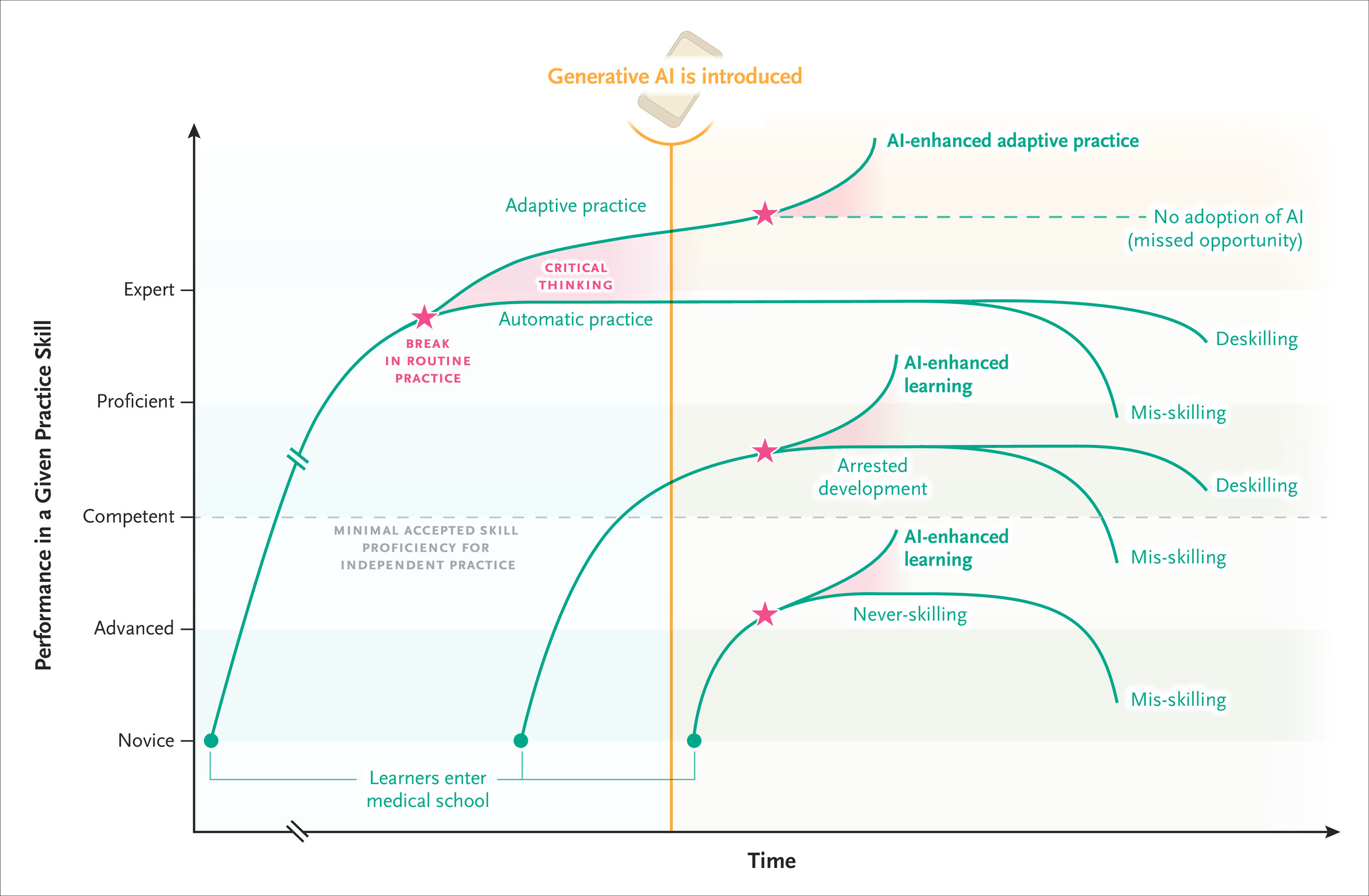
Both are versions of a long-known phenomenon. Automation bias — the tendency to over-trust an automated system and stop scrutinizing it — has been documented in clinical decision support for decades, and it causes the most harm exactly where the stakes are highest (Goddard et al. 2012). A related trap in research is the illusion of understanding: AI tools can make a field feel mastered and a result feel explained when neither is actually true (Messeri and Crockett 2024).
The productive struggle is the learning. This book’s preface argues that the “Read–Do” loop — reading a little, then immediately trying it yourself — is what moves knowledge into long-term memory. AI is most corrosive when it lets you skip the “Do.” So protect it deliberately: attempt the problem before you ask the AI, and treat the AI’s answer as something to check against, not to copy.
A few habits keep AI on the right side of this line:
- Try first, ask second. Write your own attempt — even a broken one — before prompting. You will understand the AI’s answer far better, and you will notice when it is wrong.
- Make the AI explain, not just produce. Ask why a piece of code works, or ask it to walk you through the logic, rather than only requesting the finished snippet.
- Practice unplugged. Periodically solve problems with no AI at all, the way a musician practices scales — this is how you find out which skills are actually yours.
- Verify by hand on small cases. Run AI-suggested code on a tiny example whose answer you can work out yourself.
D.8 Using AI constructively: when to lean in, and when to step back
AI is not equally appropriate for every task or every moment. A useful mental model is to ask two questions before reaching for it: How well do I understand this already? and How costly is a mistake?
Lean in when the task is low-stakes and reversible, when you are exploring or brainstorming, when you are learning a concept you can then verify, or when you are stuck and need a starting point. These are situations where an occasional wrong answer costs you a little time and nothing more, and where the act of checking the AI’s output is itself good practice.
Step back — or skip AI entirely — in two situations in particular:
- Under time pressure. Deadlines are exactly when you are least able to carefully verify an answer and most tempted to accept it on faith. Automation bias is strongest when attention and time are scarce, so the moment you feel rushed is the moment an unchecked AI answer is most likely to slip through (Goddard et al. 2012). If you cannot afford to verify it, you cannot afford to trust it.
- In high-stakes environments. Where an error could harm a patient, corrupt a published result, or expose protected data, the cost of a confident-sounding hallucination is far too high to absorb. In these settings AI should at most be a second opinion that a qualified human checks — never the final word — and its use should be governed by your institution’s policies rather than left to individual judgment (Meskó and Topol 2023).
One well-studied way to keep yourself honest is a cognitive forcing function: a small deliberate friction that makes you engage before you accept. Asking the AI to justify its reasoning, committing to your own answer first, or requiring a manual check before you act all measurably reduce over-reliance and the errors it produces (Buçinca et al. 2021). The goal is not to use AI less for its own sake, but to make sure a human mind — yours — is still in the loop where it matters.
D.9 The Future: AI in Bioinformatics and Data Science
The field of AI is evolving at a breathtaking pace, and its integration into bioinformatics and data science is only set to deepen. We may see more sophisticated AI-powered tools for hypothesis generation, experimental design, drug discovery, and personalized medicine. As future biologists and data scientists, cultivating an adaptable mindset and committing to continuous learning will be key to navigating and leveraging these advancements effectively. Staying curious about new tools, while maintaining a strong foundation in scientific principles and ethics, will serve you well.
D.10 Practical Exercises and Activities
To help you get comfortable and skilled in using AI tools, we encourage you to try the following:
- Conceptual Clarification: Choose a statistical concept from this course that you find somewhat challenging (e.g., “false discovery rate,” “cross-validation,” or “the assumptions of linear regression”). Use an LLM to ask for an explanation tailored to a biologist. Note down your prompt and the AI’s response. Then, try to re-explain the concept in your own words to a classmate, drawing from (but not merely repeating) the AI’s explanation.
- R Code Generation & Adaptation: Imagine you have a data frame in R named
rna_seq_datawith columnsgene_id,sample_name,normalized_count, andtreatment_group(with levels “control” and “treated”). Ask an LLM to generate R code usingdplyrandtidyrto calculate the averagenormalized_countfor eachgene_idwithin eachtreatment_group, and then spread the data so that ‘control’ and ‘treated’ averages are in separate columns for each gene. Once you have the code, test it with some sample data (you can ask the AI to generate that too!) and ensure you understand each step. - Debugging Practice: Take a piece of R code. First, try to understand and debug it yourself. Then, paste the code and the error message into an LLM and ask for help. Compare the AI’s suggestions to your own troubleshooting. Did it help you find the solution faster? Did it explain the error well?
- Visualization Brainstorming: Provide a clear description of a biological dataset, ideally one of your own (e.g., “A dataset containing measurements of 5 different cytokine levels in blood samples taken from patients at 3 time points post-vaccination, with patients also categorized by age group (young, middle, old).”). Use an LLM to brainstorm 3-4 different types of visualizations you could create using
ggplot2to explore this data. For each visualization, describe what insights it might provide. - Solve it twice. Pick a small exercise from an earlier chapter and solve it without any AI help. Then solve the same problem by prompting an LLM and accepting its answer. Compare: which version do you understand better, and which could you reproduce next week without help? Use this to calibrate where AI genuinely helps your learning versus where it quietly does the learning for you.
As you work through these exercises, make it a habit to document the prompts you use and critically assess the AI’s responses. Reflect on when the AI was most helpful, when its advice was off-base, and how you can refine your prompting strategy for better results in the future. This reflective practice is key to becoming a discerning and effective user of AI in your scientific endeavors.