7 Work like a project
The app you built in Chapter 6 is finished in the sense that it works. If you never open it again, that’s enough. But most useful things get opened again. Next month you’ll want it to read another file format, a colleague will ask why it rounds the way it does, and you’ll ask an agent to make “one small change” that quietly breaks something you checked by hand three weeks ago.
At that point two questions matter, and a chat transcript answers neither. The first is why is it like this? Somebody chose to reject zero-width peaks, or to draw charts without a library, or to treat CSV coordinates as 0-based. If that choice isn’t written down, the next person to touch the code, and the agent most of all, will “fix” it. An agent tidying code can’t tell a deliberate decision from an accident. The second is how do I get back? Agents edit many files quickly and confidently. When a change goes wrong you want to return to the last version that worked, exactly, without remembering what it looked like.
Software projects settled both questions long ago, and the answers are cheap. This chapter adds three habits to the app you already have: the ledger from Chapter 2, for every change; decision records, for the few choices that would be awkward to undo; and git, the undo button, if you have it or can install it. If you can’t, you’ll keep dated copies of the folder instead, and that is fine.
You don’t have to type git commands, or remember them. The agent runs them. Your job is the same as everywhere else in this book: say what you want, and check what happened.
7.1 What you’ll learn
- Why a project you’ll come back to needs a record of what was decided and why, not just what the code does.
- How to write a short architecture decision record (ADR), and why “must not” in a file called
adr/works on agents as well as people. - How to have the agent commit each change with a real message, show you the history, and go back when something breaks.
- What to do instead if git isn’t available: snapshots.
- Where to go next: GitHub, issues and pull requests.
7.2 Three records, three questions
Each habit answers a different question, and they don’t replace each other (Table 7.1). The ledger is the story of your work with the agent: what you asked, what it did, how you checked. A decision record is the reason behind one choice, written once and kept. A commit is the exact change to the files, with a way back.
| Answers | Write one | Who reads it | Changed later? | |
|---|---|---|---|---|
| Ledger entry | What did I ask, what happened, how did I check? | For each piece of work worth recording | You, a reviewer, your PI | No: add a new entry |
| Decision record | Why is it this way? What must not change? | Only for choices awkward to reverse | The next person, and the agent before it edits | No: a new record supersedes it |
| Commit | What exactly changed, and when? | For every change that works | git, and anyone going back | No: history is kept |
| Snapshot (no git) | How do I get back? | Before every change | You, when something breaks | No: make a new one |
A useful rhythm is one loop per change (Figure 7.1). Decide whether it’s a decision worth recording; if so, write the record first, so the agent builds to it. Make the change. Check it. Write the ledger entry. Commit.
flowchart LR
  accDescr: One loop per change. Next change; if awkward to reverse, write an ADR first; make the change; check it; if broken, go back; if it works, ledger entry, then commit or snapshot.
  A[Next change] --> B{Awkward to<br/>reverse?}
  B -- yes --> C[Write an ADR]
  B -- no --> D[Make the change]
  C --> D
  D --> E[Check it:<br/>tests, by eye]
  E -- broken --> F[Go back]
  F --> D
  E -- works --> G[Ledger entry]
  G --> H[Commit or<br/>snapshot]
7.2.1 Decision records
An architecture decision record is a short numbered file, one per decision, with three parts: the context that forced a choice, the decision, and its consequences, good and bad. Michael Nygard proposed the format in 2011, for software teams that kept losing the reasons behind their own designs (“Documenting Architecture Decisions” 2011). They live together in a folder called adr/, numbered in order: 0001-…md, 0002-…md.
Two rules make them work. First, write only the decisions that would be awkward to reverse, or that someone would be tempted to undo: which coordinate convention a file uses, whether to depend on a library, what counts as a duplicate. “Make the button blue” isn’t one. Second, a decision record is never edited to reverse it. If you change your mind, you write a new record that says it supersedes the old one, and mark the old one “superseded by …”. The history of your thinking stays readable. Fixing a factual slip in the wording is fine, and it’s honest to append a short “Correction” note saying so.
Decision records turn out to suit agents unusually well. An agent reads a folder before it changes things, and it follows plain, imperative rules. “We generally prefer hand-written charts” reads to an agent as a preference it can weigh against your latest request. “The page must not load anything from the network” reads as a rule. Write the Decision section with must and must not, and add one line to your AGENTS.md (Chapter 3) telling the agent to read adr/ before changing behaviour.
7.2.3 No git? Snapshots
Some laptops won’t let you install anything, and some people would rather not today. Then ignore git entirely. Before each change, ask the agent: “Copy everything in this folder except snapshots/ into snapshots/
7.3 Worked example
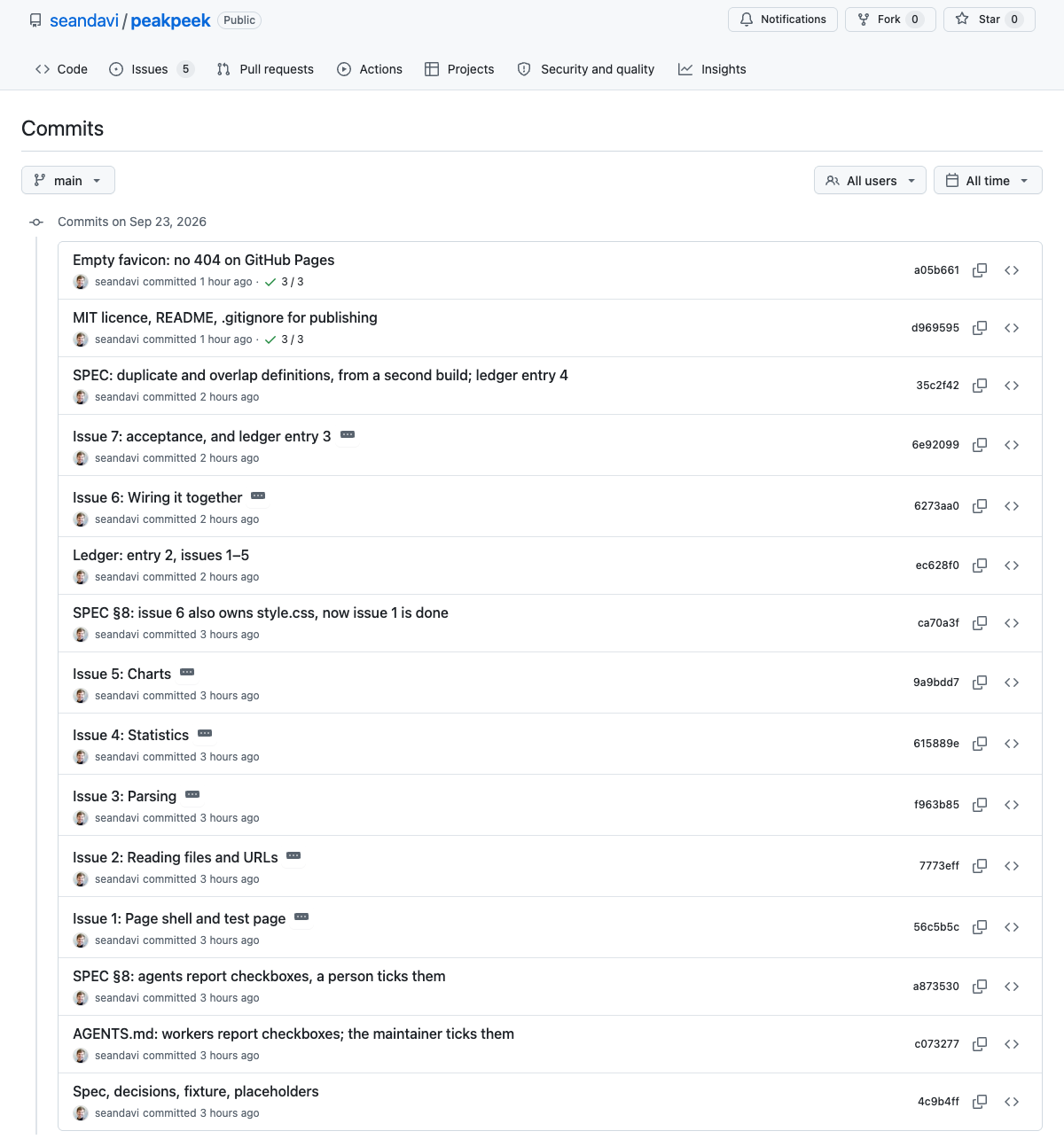
PeakPeek is a small browser page that summarises a peak file: widths, chromosomes, duplicates, overlaps. It’s the same app as the fallback in Chapter 6, built the long way by several agents in one afternoon, with Sean as the maintainer (an agent did most of the maintaining on his behalf, and the records say so). Its folder holds a specification, eleven decision records, a four-entry ledger and fifteen commits (Figure 7.2). It’s small enough to read in ten minutes, and every record in it is real.
A decision record. The specification left eleven questions open, and each got an ADR (Figure 7.3). Here is 0009, in full (rewrapped to fit):
# 0009 — Hand-written SVG or a charting library

**Status:** accepted
**Deciders:** orchestrating agent, acting for Sean Davis
(not yet reviewed by him). SPEC.md §6 Q9, suggested default taken.

## Context

A library means a CDN (network, and a third party sees the page
load) or a copy in the folder (and its licence).

## Decision

Hand-written SVG.

## Consequences

About 60 lines per chart; no dependencies at all.
Three short sentences. Without them, an agent asked to “make the histogram nicer” might well reach for a charting library, and the page would quietly start loading code from someone else’s server.
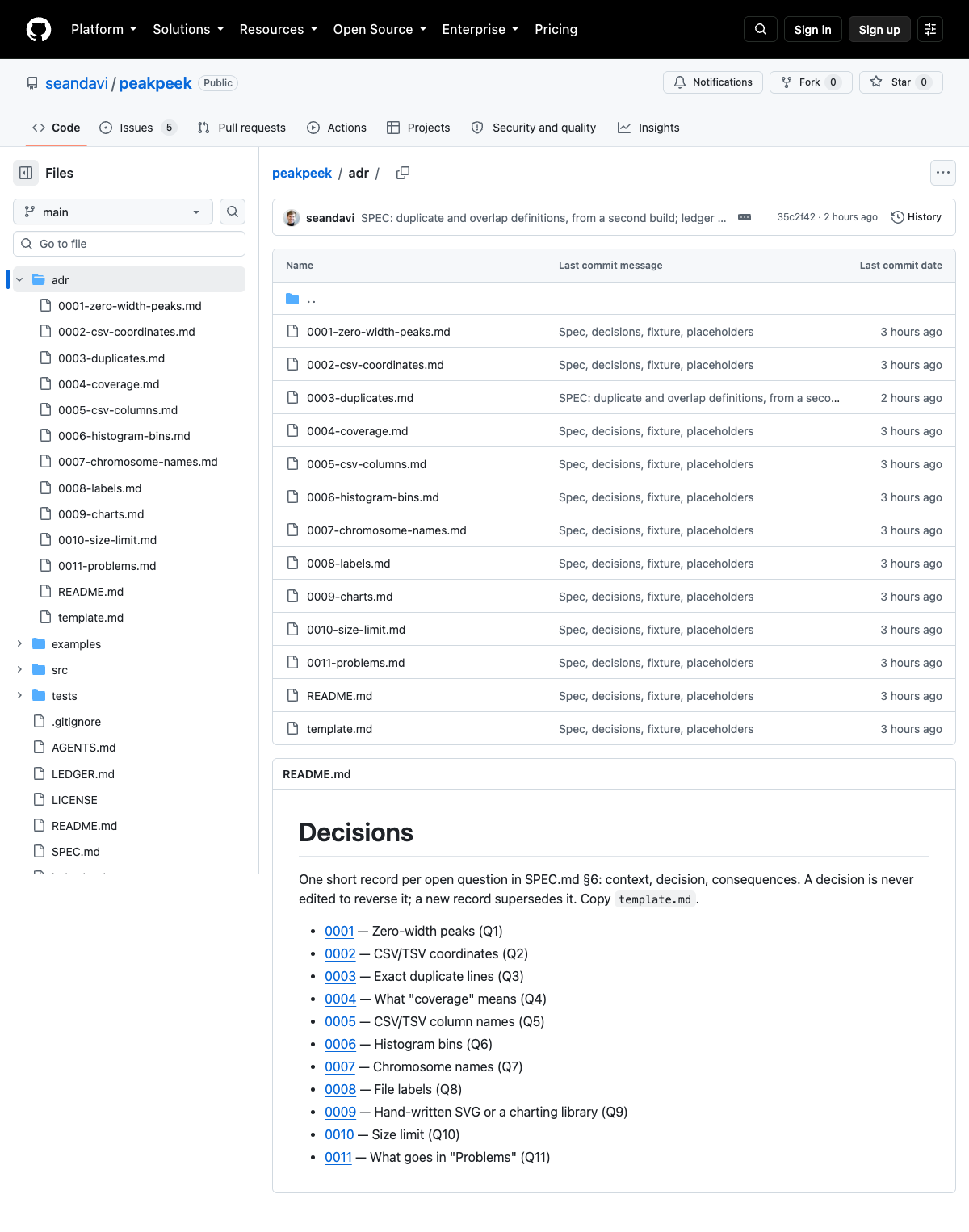
adr/ folder: one file per decision, an index, and a template to copy.
A change that touched all three records. After the first build, a second agent built the same app independently from the same spec, as a test of the spec. Wherever the two builds disagreed, the spec hadn’t said something. One disagreement showed that ADR-0003 was wrong about a fact: the CTCF file’s “exact duplicate line” was really two peaks with the same coordinates and different scores. The decision (count duplicates and flag them) still stood, so the record wasn’t rewritten. It got a “Correction” note appended. The commit that made the fix, 35c2f42, changed three files together: the spec, the ADR’s correction, and ledger entry 4, which reads in part:
Confidently wrong — Orchestrator: SPEC §2 said CTCF has “an exact duplicate line”. It has a duplicate peak: same coordinates, different scores. […] ADR-0003 has a correction note.
Keep — A second independent build is a cheap test of a spec: every place the two disagree is a sentence the spec didn’t write.
A mistake the records caught. Ledger entry 2 records that, while five agents were writing code in the same folder, the orchestrating agent committed a spec change with a command that commits every changed file. It swept three agents’ half-finished code into the commit. One of the other agents noticed, and the commit was redone with the spec alone. The lesson went into the ledger’s “Keep” field. You probably won’t run five agents at once, but the general point holds: look at what a commit includes before trusting it, which is why the prompts below ask the agent to show you.
What we checked for this section: the commit list, the ADR folder and the files quoted above, read directly from the repository on 23 September 2026. We didn’t re-run PeakPeek’s tests for this chapter; its ledger records how they were checked.
7.4 Your turn
You need the folder from Chapter 6, Documents/agents-workshop/my-app, with your app in it and its LEDGER.md. No app? Use the PeakPeek exercise from Chapter 6 as your starting point, or any small folder you care about. Start a new session in that folder, and ask “What folder are you in?” before anything else.
Allow 30–40 minutes. There are three steps: set up, two changes, and one deliberate mistake. With git, your history will end up looking something like Figure 7.4.
gitGraph
  accDescr: On main, a starting point, change 1 with an ADR, change 2, a deliberate mistake and its revert, with ledger entries. A try-idea branch holds one unmerged experiment.
  commit id: "Starting point"
  commit id: "ADR-0001 + change 1" tag: "Ledger 1"
  commit id: "Change 2" tag: "Ledger 2"
  branch try-idea
  commit id: "Experiment"
  checkout main
  commit id: "Deliberate mistake"
  commit id: "Revert mistake" tag: "Ledger 3"
git keeps everything you ever commit. If the folder holds data you couldn’t share, anything identifiable, or any password or key, move it out, or have it listed in .gitignore so git never records it, before the first commit. Snapshots keep copies too: the same care applies.
7.4.1 1. Set up
First, find out whether you have git. Your readiness.md from Setup has the answer as of this morning, but ask again: you may have installed it since, and the check takes a second. Paste this:
Is git installed on this computer? Just check, and tell me the version
if so. Don't install anything yet. If it isn't installed, tell me the
simplest way to install it on my operating system, and wait for me.- macOS: typing
gitin Terminal usually offers to install Apple’s Command Line Tools, which include git. Accept, and wait a few minutes. The agent may suggestxcode-select --install, which does the same. - Windows: install Git for Windows, or, in PowerShell,
winget install --id Git.Git -e --source winget. Then start a new agent session so it can find git. - Can’t install it (a managed laptop, or no time): skip every git step below and use the snapshot prompts instead. You lose nothing that matters for this chapter.
After installing Git for Windows, restart the Claude desktop app or your terminal before asking again. The installer’s defaults are fine. Claude Code on Windows uses git’s bundled Git Bash to run commands when it’s installed, and PowerShell when it isn’t (“Advanced Setup,” n.d.); either works for this chapter. Folder paths will look like snapshots\start.
OneDrive and git can clash. If your Documents folder is synced to OneDrive, OneDrive may lock or re-sync files inside the hidden .git folder while git is writing them, and the repository can end up broken. Pause OneDrive syncing while you work, or keep the project in a folder outside OneDrive (for example C:\Users\<you>\agents-workshop). See Appendix A for more.
Then set up the records. With git:
Set this folder up as a project I'll come back to.

1. Make it a git repository. Before committing anything, add a
   .gitignore that lists snapshots/ and anything else that shouldn't
   be recorded (large data, anything private, system files like
   .DS_Store). Then show me the list of files you would commit, and
   wait for my OK. If git asks for a name and email, ask me what to
   use.
2. Create adr/ with a README.md index and a template.md: title, status
   (accepted, or superseded by ADR-NNNN), date, Context, Decision
   (written with "must" and "must not"), Consequences.
3. If there's no LEDGER.md, create one with the fields Asked, Agent
   did, Checked how, Confidently wrong, Keep.
4. Add to AGENTS.md (create it if needed): read adr/ before changing
   how the app behaves; never edit an accepted ADR to reverse it,
   write a new one that supersedes it; every change gets a ledger
   entry and a commit. If there's no CLAUDE.md, create one containing
   the single line @AGENTS.md.
5. Commit everything as the starting point, then show me the history.
Without git, replace steps 1 and 5 with:
Instead of git, keep snapshots. A snapshot means: copy everything in
this folder except snapshots/ into snapshots/<name>/. Make one before
any change, named for the change. Make the first one now, called
"start", and add the snapshot rule to AGENTS.md.
Check that adr/, LEDGER.md, AGENTS.md and CLAUDE.md exist, and open AGENTS.md to read the rules the agent wrote for itself. Are they what you asked for? (CLAUDE.md holds only @AGENTS.md, so Claude Code reads the same rules as other agents; Chapter 3 explains why.)
7.4.2 2. Two changes, the full loop
Pick two improvements to your app. Try to make one of them a real decision: something with more than one sensible answer, where you’d want to remember why you chose. Examples: what to do with missing values, which file formats to accept, whether a threshold is fixed or adjustable, whether to use a library. The other can be small.
For each, paste this, with your change filled in:
Next change: <describe it>.

1. If this involves a decision that would be awkward to reverse, write
   an ADR in adr/ first, and show it to me before building.
2. Make the change.
3. Check it: run the tests if there are any, and tell me exactly what
   I should check by hand.
4. Add a ledger entry. "Checked how" says only what was actually run
   or looked at.
5. Show me what's changed since the last commit, then commit it with a
   message that says what changed and why. Show me the history.
(Without git: ask for a snapshot before step 2, and leave out step 5.)
Do the hand check yourself before you let it commit. If the agent’s ADR doesn’t match what you’d decide, say so: the ADR records your decision, not the agent’s suggestion.
7.4.3 3. Break something, then go back
Now make a mistake on purpose, so you’ve seen the way back work before you need it. Choose something whose effect you’ll notice: a label, a calculation, a colour.
For practice: make a deliberate mistake in the app (for example,
<an idea>), and commit it with the message "Deliberate mistake, for
practice". Then show me the history.
Open the app and see the mistake. Then:
Revert the last commit, so the history keeps both the mistake and the
undo. Show me the history, and check that the app is back to how it
was. Then write one ledger entry covering both: what broke, how we
went back, and how we checked.
Without git:
For practice: copy everything in this folder except snapshots/ into
snapshots/before-mistake/. Then make a deliberate mistake
(for example, <an idea>). When I've seen it, restore the app from that
snapshot. Don't touch LEDGER.md or snapshots/ when restoring. Then
write one ledger entry covering both.With git, try an idea you’re unsure of on a branch: “Make a branch called try-dark-mode, and make the change there” (named for your idea). Look at it. Then say either “merge it into main” or “switch back to main and delete the branch”. Either way, main never saw the half-done version.
7.5 What to notice
- The agent is good at git, and fast. It knows the commands better than most people. That’s exactly why you ask it to show you what it’s about to commit: speed isn’t the same as checking.
- Commit messages are for later readers, including agents. “Update files” is useless in a month. “Reject negative widths, per ADR-0002” tells the next reader, and the next agent session, what happened and why.
- Did the agent treat your ADR as a rule? Try asking for a change that contradicts one. Does it stop and point to the record, or cheerfully go ahead? If it goes ahead, look at how the Decision is worded, and at whether
AGENTS.mdtells it to readadr/. - Going back felt like nothing. That’s the point. Once going back is cheap, you can let the agent try bolder changes.
7.6 Check yourself
7.7 Going further
- GitHub. Putting the folder on GitHub adds a copy off your laptop, issues to track what’s next, pull requests so someone (or another agent) reviews a change before it lands, and automatic tests on every change. It’s also where the privacy warning above starts to matter. PeakPeek’s issue #1 sets out how to build and run it that way, step by step.
- Learning git properly. For R users, Happy Git and GitHub for the useR is the kindest introduction. The free Pro Git book is the reference.
- More on decision records: the templates and tools collected at adr.github.io, and this workshop’s own
adr/andLEDGER.md.