2 The ledger
In Chapter 1 you asked an agent for a web page, and a few minutes later you had one. Look at what you have now. There’s a file on disk, and a chat that scrolls back a long way. The file tells you what the agent produced. It doesn’t tell you what you asked for, what the agent actually did to get there, or which parts of it anyone has looked at closely. The chat has some of that, mixed in with everything else, and it disappears when you close the session.
That matters because of what you saw this morning: an agent’s mistakes read exactly like its correct work. It says “done” in the same confident voice whether it checked something or not, and it often reports checks it didn’t run. Nothing in the output tells the two apart. The only thing that separates work you can trust from work you can’t is what someone actually checked, and unless that is written down, it’s gone by tomorrow.
The ledger is where it gets written down. It’s a plain text file, LEDGER.md, that sits next to your work, with one short entry for each piece of work that matters: what you asked, what the agent did, how it was checked, what it got confidently wrong, and what’s worth keeping. It is the agent-era version of the lab notebook you already keep at the bench, and it answers the questions your PI, a reviewer, a collaborator or you in six months will ask about anything an agent helped make: which parts of this can I trust, and why?
Two things make it different from a lab notebook. First, the agent writes it. Sometimes you ask for an entry; more often, once you’ve told it to keep a ledger, it adds one on its own when it finishes something. It was there for every step, so it’s better placed than you to say what it read, wrote and ran. Your part is smaller and matters more: you read each entry and correct it, above all the line that says how the work was checked. Second, it is not a record of everything. A session has dozens of small requests. The ledger keeps the few that someone might later need to know about, and lets the rest go.
Markdown is plain text with a few conventions: # starts a heading, **bold** is bold, > starts a quotation. Any text editor can open a .md file, and GitHub shows it formatted.
Skip to Your turn and come back to the reading later.
2.1 What you’ll learn
- Why an agent’s work needs a written record, and who reads it.
- The five fields of a ledger entry, and why Checked how is the one that must never be blank.
- Who writes it: the agent, on its own or when asked. Your job is to correct it.
- What earns an entry, and what doesn’t.
- Why an agent’s account of its own checking claims more than happened, and how to correct it.
2.2 Five fields
A ledger entry has five fields. The template is in this workshop’s repository as LEDGER-template.md.
| Field | What goes in it | A useful entry | A useless entry |
|---|---|---|---|
| Asked | The prompt you actually typed, pasted, not tidied | “Make me a one-page website about my 2024 paper, using the abstract below …” | “Asked for a website.” |
| Agent did | What happened: files read and written, commands run | “Wrote index.html (one file). Read nothing else. Ran no commands.” |
“Built the site.” |
| Checked how | What you did to confirm it. Never blank; “Not checked” is allowed | “Opened it in Chrome. Read every sentence against the abstract. Clicked the DOI link. Not checked: on a phone.” | “Looks good.” or “The agent verified it.” |
| Confidently wrong | Anything it stated that wasn’t true, or “Nothing caught” | “Gave the year as 2023; it was 2024. Said it had checked the page on mobile; nothing in the session shows it opened the page at all.” | (left blank), or an invented failure to fill the box |
| Keep | The prompt, file or lesson worth taking away. Often nothing | “Pasting the abstract, not the DOI, stopped it making things up about the paper.” | “Agents are great!” |
Most of the fields are easy. Two need more thought.
Checked how is the field that matters, and it’s the one you can’t leave to the agent. It records verification that actually happened: what you did, or what the agent did and can point to (the command it ran, the file it opened). It is not the verification the agent says it did. “The agent said the tests pass” is not a check; “I opened test.html and it shows 56 passed” is. And “Not checked” is an honest, acceptable answer. You won’t check everything, and you shouldn’t try. What you must not do is leave the field blank, because a blank reads as “fine” to whoever comes after you. An empty box is uncomfortable in a way that “I meant to check that” never is, and that discomfort is the whole mechanism.
Confidently wrong is the one people skip, because it feels like admitting a mistake. It isn’t yours; it’s the agent’s, and collecting them is how you learn where this agent, on your kind of work, goes wrong. Over a week the pattern shows up: dates, units, fold-change directions, claims to have run things. “Nothing caught” is a legitimate entry. Don’t invent failures to fill the box.
“Before doing that, it is important to document how you know the experiment failed, since the interpretation of your results may not be obvious to someone else reading your lab notebook.” Noble’s advice on computational lab notebooks (Noble 2009) applies unchanged to agents.
2.3 Who writes it
The agent does, because it was there. It knows which files it read, what it wrote and which commands it ran, and it can paste your prompts exactly. Asked to reconstruct those an hour later, you can’t, and neither can a new session that never saw the work. So an entry is best written by the agent, at the time, and there are two ways to get one (Table 2.2).
| How the entry gets written | What starts it | Your part |
|---|---|---|
| On its own | A standing instruction: “keep LEDGER.md as we work”. Paste it at the start of a session, or put it in the file the agent reads every time (Chapter 3) |
Read each new entry. Correct Checked how and Confidently wrong |
| When you ask | “Add a ledger entry for that.” Use it when something mattered and the agent didn’t record it | The same |
| By you | Rarely: a check you did outside the session, or a correction to an earlier entry | Write it |
“On its own” needs saying carefully. No agent keeps a ledger unprompted. It does it because an instruction tells it to, and after that it decides for itself when a piece of work deserves an entry. That’s convenient, and it’s also where it goes wrong: an agent writing its own record will describe the checks it meant to do as checks it did. That’s why the entry is the agent’s, but Checked how is yours to correct.
Figure 2.1 shows where the ledger sits in a session. The dashed line is the shortcut to avoid: accepting the agent’s entry as it wrote it.
flowchart LR
  accDescr: A loop. You ask, the agent acts, the agent writes a ledger entry, you check the work, you correct the entry's Checked how, then the next task. A dashed shortcut goes from the agent's entry straight to the next task, labelled as the step to avoid.
  ask["You ask"] --> act["Agent acts"]
  act --> write["Agent writes<br/>the entry"]
  write --> check["You check<br/>the work"]
  check --> fix["You correct<br/>Checked how"]
  fix -- "next task" --> ask
  write -. "accepting it as written:<br/>avoid" .-> ask
2.4 What earns an entry
A ledger is not a transcript. The chat already has everything; the ledger’s job is to keep the few things someone will need to know later, and it only works if it’s short enough to read. One entry usually covers a whole task, several prompts long, not one prompt. The test is simple: would someone reading this in six months need to know it happened, or how it was checked?
| Worth an entry | Not worth one |
|---|---|
| A new file or feature, or a change someone could ask about | “Make the heading bigger”, a typo fixed |
| Anything you checked, or decided not to check | Rewording you’ll never think about again |
| Anything the agent got wrong, and how you found out | A dead end that changed nothing and taught nothing |
| A choice between two ways of doing it | Asking the agent to explain something |
| Anything that leaves your computer: shared, sent, published | Each of five small tweaks, when one entry covers them |
This workshop’s own ledger, written by an agent under Sean’s direction, has sixteen entries for about forty commits. When you give the agent the standing instruction, give it this test too, and expect to adjust it: some agents record every keystroke, some skip things that mattered. Either way, tell it.
2.5 What real ledgers look like
A ledger doesn’t need these exact headings. It needs to say what was done and what a person actually checked. Three public ones: this workshop’s own LEDGER.md, whose entries the agent wrote and which marks who did each check; PeakPeek’s, which records which agent’s claims were re-run and which were taken on trust; and the AI ledger of Sean’s course book AI in Medicine, with its narrative companion, How this book was made (Figure 2.2) (“Appendix A — How This Book Was Made – AI in Medicine,” n.d.; “Appendix C — AI Ledger – AI in Medicine,” n.d.).
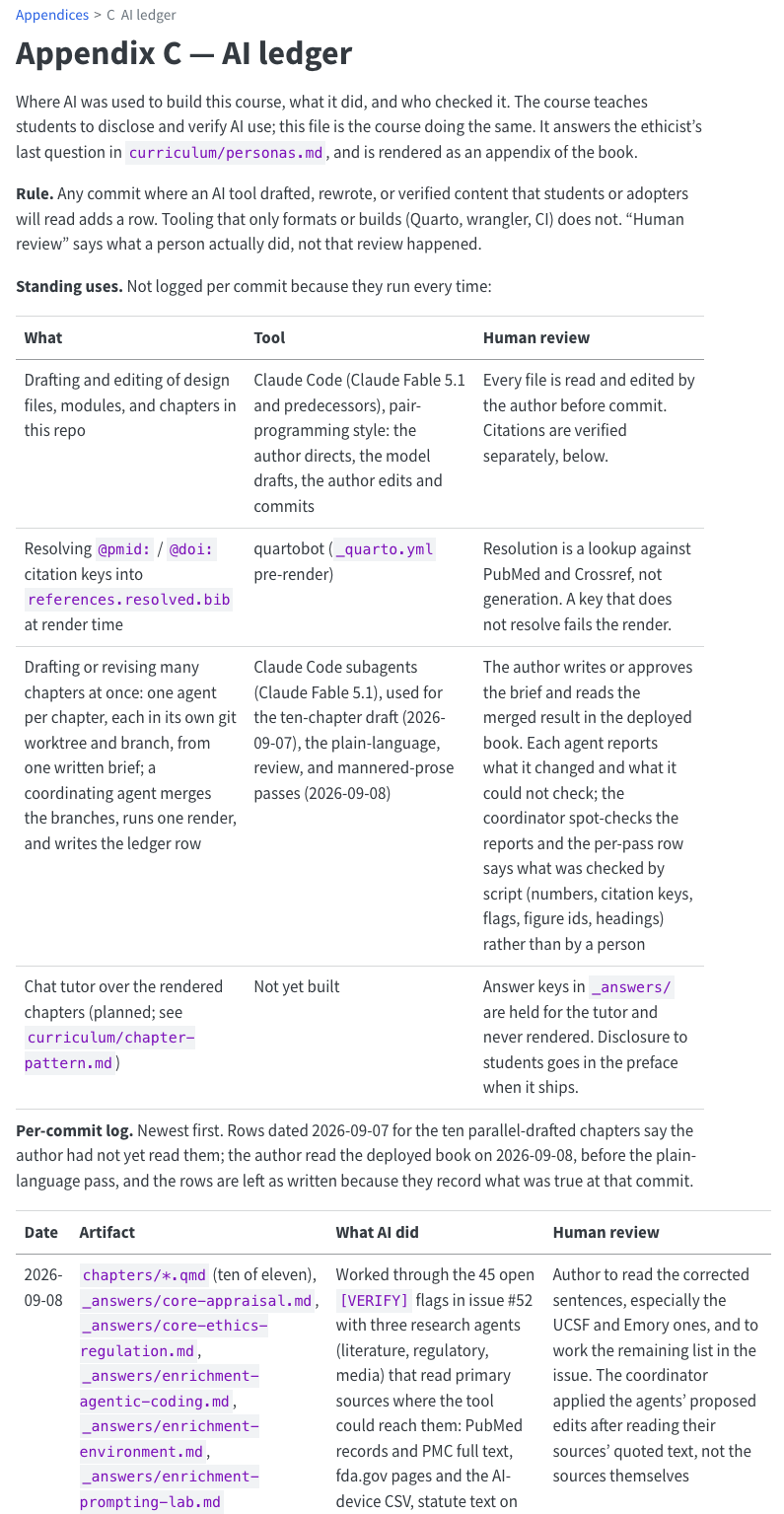
Two things in that ledger are worth copying. Its Human review column is held to the same standard as Checked how: what a person did, not that review happened. And rows that turned out incomplete were left as written, “because they record what was true at that commit”. A ledger entry is never edited later to look better. If something changes, add a new entry.
2.6 Worked example
Here is the ledger entry for Chapter 1’s worked example, the one-page website about the DESeq2 paper. An agent wrote it from the record of that run, and its Checked how says who did each check. If you did chapter 1, you’ve seen every fact in it.
## Entry 1 — A one-page website about the DESeq2 paper

**Asked**

> Make me a one-page website about this paper: https://doi.org/10.1186/s13059-014-0550-8
>
> It should be a single HTML file I can open by double-clicking. Write it for a
> biologist who has heard of RNA-seq but never used DESeq2. When you're done, tell me
> where the file is and what you checked.

Then:

> It's too long for someone skimming. Cut it down so the main story fits on about two
> screens: keep the one-sentence summary, the big idea with both diagrams, and
> 'in practice'. Put everything else behind 'more detail' sections I can click open.

> Add a dark mode that follows my computer's light/dark setting.

> What did you put on this page that I didn't tell you and you couldn't have checked?
> List it, most important first.

**Agent did**

Tried a PubMed tool (not allowed); the publisher's page redirected to a login three
times; got the full text from Europe PMC instead. Wrote `deseq2.html` (one file, 29 KB)
and a hidden helper script, `.check_html.py`. Tried to open the page and run the script:
both refused. Shortened the page, with six click-to-open sections, and added an
`lfcShrink()` line to the R code unasked. Added dark mode, moving the diagram colours
into the style sheet. Said each time that it had not seen the page.

**Checked how**

*Agent, not a person:* a second agent, driving a real Chrome window, did these; nobody
has repeated them by hand. Opened `deseq2.html` in Chrome: no errors in the console. Moved the replicates slider
(label went from 28% to 72%) and pressed the shrinkage button: both diagrams redrew.
Opened all six "more detail" sections. Clicked the three links (the DOI, two
Bioconductor pages): all load. Title, authors, journal and year match the DOI's record
at Crossref. Switched the computer to dark mode: the page followed.
Not checked: the statistics on the page against the paper's text; whether the
`lfcShrink()` line runs; the "since 2014" section.

**Confidently wrong**

Nothing caught that was plainly false. But asked what it couldn't have checked, it
listed things the page presented as confidently as the checked parts: the `lfcShrink()`
line is untested and may need the `apeglm` package; the "since 2014" section is from
memory; the paper's facts came through a fetch tool that summarises pages; and the
shrinkage diagram draws only well-measured genes as real effects, so shrinkage looks
free. None of this was flagged on the page.

**Keep**

Before trusting a page, ask: "What did you put on this page that I didn't tell you and
you couldn't have checked?"
What makes this entry useful:
- One entry, four prompts. The task is the unit, not the prompt: the first request and three follow-ups make one piece of work, so they make one entry.
- Asked is pasted whole, follow-ups included. Anyone can run the same prompts again. “Asked for a website about DESeq2” would lose the reader, the one-file rule, and the question that did the most work.
- Checked how says who checked. The agent that built the page said it had checked the paper’s details against the full text; that’s its claim, so it isn’t here. The checks that are here were made by a second agent in a real browser, and the entry says so up front. Your own entry should hold what you did. Each of these is a minute’s work by hand, and has numbers in it (28% to 72%, six sections, three links); the Not checked line names exactly where to look before publishing.
- Agent did records the surprises: the refused steps, the hidden file, and the line of R code nobody asked for. Those are what a reader would otherwise never know.
- Confidently wrong doesn’t invent a failure. Nothing false was caught, and it says so, then records the unsupported claims that only surfaced when asked.
- Keep is one sentence, and it’s a practice, not a compliment.
Plenty of entries will say Confidently wrong: nothing caught. That’s fine, and it’s information: it tells a reader you looked. What isn’t fine is making something up to fill the box, or leaving it blank.
2.7 Your turn
You’ll use the agents-workshop/website folder from Chapter 1. If you didn’t do that chapter, do its activity first: it takes about twenty minutes, and this chapter builds on it.
Allow about 20 minutes for steps 1 to 4. Step 5 is for if you have time.
One LEDGER.md per folder. This ledger is for the website and lives in its folder. Each later chapter works in its own folder inside agents-workshop, and starts its own LEDGER.md there.
2.7.1 1. Put the template in your folder
Go back to your chapter 1 session if it’s still there: in the desktop app, old sessions are listed in the sidebar; with the command line, run claude -c in the website folder. If you can’t find it, start a new session with the website folder as its folder, as in Setup. Then paste:
Download https://raw.githubusercontent.com/seandavi/2026-penn-epigen-agentic-workshop/main/exercises/LEDGER-template.md and save it in this folder as LEDGER.md. Save the exact file with a download command, not your web-reading tool; don't retype it. Then tell me the full path of the file you saved.Check it’s there: open the folder in Finder or File Explorer and look for LEDGER.md, then open it. On a Mac, right-click it and choose Open With → TextEdit; on Windows, Notepad will do. In the Claude desktop app you can also click a file path in the chat to open it in the file pane, edit it and click Save (“Desktop Application,” n.d.). On Windows, if LEDGER.md shows as just LEDGER, or you’re not sure it hasn’t become LEDGER.md.txt, turn on file extensions (Appendix A).
2.7.2 2. Ask the agent for entry 1
Have the agent write the entry for the website you built in Chapter 1:
Add entry 1 to LEDGER.md, for the website we made, using its five fields. One entry for the whole task, not one per prompt. Under Asked, paste my prompts exactly, if you can see them. In Checked how, list only what you actually did, with the command you ran or the file you opened, and add "(your check)" for me to fill in. If there's anything you can't know, say so rather than guessing.In a new session, the agent never saw chapter 1. It can see the files, but not what you asked or what it did then. Watch what it does about that: does it say so, or does it fill the gaps with a plausible story? If it asks, paste your chapter 1 prompts in.
2.7.3 3. Correct it
Now do the part that’s yours. Open LEDGER.md and read the entry against what happened.
- Checked how. Is there anything the session doesn’t show being done? Agents tend to write the checks that should have happened as if they did: “verified the page renders correctly”, “confirmed all links work”. Then replace “(your check)” with what you did: opened the page, read it against your source, clicked the links. Anything nobody checked goes in as “Not checked: …”.
- Confidently wrong. Did the page state anything that wasn’t true? Did the agent claim a check it couldn’t have made? If not, “Nothing caught”.
- Asked and Agent did. Are the prompts really yours, word for word? Are there files in the folder the entry doesn’t mention?
If you’d rather the agent did the first pass, ask it:
Go through the Checked how field of entry 1. For each item, say whether you actually did it, and what exactly you did (the command, or the file you opened), or whether you are assuming it. Rewrite the field so that anything you didn't do is listed as "Not checked".Edit the file yourself, or tell the agent what to change. Either way, the corrected entry is the record.
2.7.4 4. Let it keep the ledger on its own
Give the agent the standing instruction:
Keep LEDGER.md as we work. When you finish something worth recording, add an entry with the five fields, without my asking. Worth recording: a new feature or file, anything checked or not checked, anything that went wrong, a choice between two ways of doing it. Not worth recording: small tweaks, which can be grouped into one entry. In Checked how, list only what you actually did, and leave "(your check)" for me.Then ask for two changes, one after the other. One that matters: a figure from your paper, a section about your methods, a publications list. And one that doesn’t: “make the heading a darker blue”. When both are done, open LEDGER.md.
- Did it add an entry for the change that mattered, without being asked?
- Did it skip the small one, or fold it into the same entry? If it wrote a whole entry for the colour, tell it that was too much. If it wrote nothing for the real change, say “add a ledger entry for that”.
- Correct the new entry’s Checked how, as in step 3.
Copy the standing instruction into your ledger’s Keep field, so you have it to hand.
Your ledger holds your prompts, pasted exactly. If you pasted anything into a prompt, it is now in LEDGER.md too. Before you share a ledger or put it on GitHub, read it for anything identifiable, unpublished or private: patient details, unpublished results, collaborators’ data, passwords or keys. Better still, don’t paste those into an agent in the first place.
2.7.5 5. Make the instruction permanent (if you have time)
A pasted instruction lasts one session. Chapter 3 shows how to put standing instructions in a file the agent reads at the start of every session, so it keeps the ledger without your asking, in every session in this folder. If you’re going on to that chapter, the ledger instruction is a good first rule to put there.
2.8 What to notice
- The agent wrote a better first draft than you would have, and in seconds, as long as it saw the work. Asked and Agent did are what it’s good at.
- Its Checked how claimed more than happened, or yours would be the first run that didn’t. An agent’s account of its own checking is a claim, like everything else it says. Correcting that one field is the whole of your job, and it’s not optional.
- A new session can’t ledger old work. If you did step 2 in one, the agent could see the page but not how it was made. That’s the argument for a ledger kept as you go.
- Not everything got an entry, and that’s right. A ledger with an entry for every colour change is one nobody reads.
- “Not checked” felt uncomfortable to write. Good. It’s the most useful line in the file, because it tells the next reader exactly where to look.
2.9 Check yourself
2.10 Going further
- Why the ledger runs through the whole day: the workshop’s decision record, ADR-0005, “The ledger is the spine of the day”. Each later chapter starts a
LEDGER.mdin its own folder, with the same five fields. - Ledgers and decision records: a ledger records what happened; a decision record records what was decided and why. Chapter 7 adds the second, for anything you’ll come back to.
- The older advice: “For every result, keep track of how it was produced” is rule 1 of Sandve and colleagues’ ten rules for reproducible computational research (Sandve et al. 2013). A ledger applies it to work an agent did.