4 Write a skill
Every lab has checks that live in someone’s head. Before anyone plots a DESeq2 table, the person who has been burned before asks which group is the reference. Before a sample sheet goes to the core, someone looks for the duplicated row and the three date formats. Before a qPCR plate gets analysed, someone checks the no-template controls. None of this is written down, so it gets done when that person is in the room and forgotten when they’re not. An agent has the same problem: each new session starts knowing nothing about your lab’s traps, and you end up explaining them again, or, worse, not explaining them and getting a confident answer that skipped the check that mattered.
A skill is how you write a check like that down once, in a form an agent picks up by itself when the task calls for it. It’s a folder with a Markdown file in it. No code, no build step, no registration. The file says what the procedure is for, when to use it, and what to do, and the agent loads it when your request matches.
The part people don’t expect is who does the writing. You don’t write the skill by hand. The agent writes it, with your direction, and you verify it. Your contribution is the part the agent can’t supply: what a good file looks like, which problems you’ve actually seen, which of them lead to wrong conclusions, and what the skill must never do. The agent is good at turning that into a clear, well-structured instruction file. It’s bad at knowing that your core’s exports put the plate barcode in row 3, and it can’t know whether its own skill works until you test it on a file where you already know the answer. This chapter is about that division of labour.
4.1 What you’ll learn
- What a skill is, where it lives, and how an agent decides to load one.
- What a published library of scientific skills offers, and what its own authors say it doesn’t show.
- How to read a real skill,
deseq2-triage, and why each part of it is there. - What a skill changes, by comparing the same request with it and without it.
- How to direct an agent to write a skill for a file you check often.
- How to verify it: on a good file, on a file with problems you planted, and on the wording that should (and shouldn’t) make it load.
4.2 What a skill is
A skill is a folder whose name is the skill’s name, containing a file called SKILL.md (Figure 4.1). The file starts with a short header, between two --- lines, holding two fields: name and description. Everything after the header is instructions, written in plain Markdown, for the agent to follow. A skill can also carry scripts/ (code for the agent to run) and references/ (longer documents it reads only when a step says to), but many good skills are a single file.
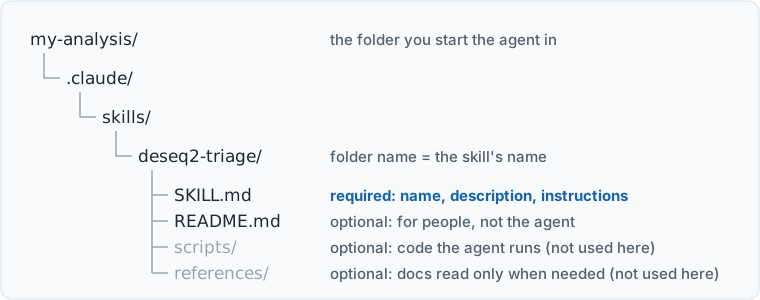
SKILL.md is required; the rest is optional. The folder sits in .claude/skills/ inside a project, or in your home folder to be available everywhere.
4.2.1 The description decides everything
When a session starts, the agent doesn’t read your skills. It reads a list of their names and descriptions: a line or two each. Only when your request matches a description does it load the rest of that skill’s file (Figure 4.2). This is called progressive disclosure, and it’s why you can have dozens of skills without filling the agent’s memory: the instructions cost nothing until they’re needed (“Extend Claude with Skills,” n.d.).
flowchart LR
  accDescr: Flowchart - the session starts, the agent reads each skill's name and
  A["Session starts"] --> B["Agent reads every skill's<br/>name and description"]
  B --> C{"Does your request<br/>match a description?"}
  C -- "no" --> D["Answers without it<br/>(no warning)"]
  C -- "yes" --> E["Loads the full SKILL.md,<br/>then scripts/ or references/<br/>only if a step says to"]
The consequence is the most important fact in this chapter. The agent never sees the body of a skill until it has already decided to use it, so a skill that never loads is indistinguishable from a skill you never wrote. No error, no warning: you just get the answer you’d have got anyway. A good description says what the skill does, then when to use it, in the words you’d actually type: “check”, “sanity-check”, “is this OK”, “can I trust this”.
4.2.2 Where skills live
An open format. SKILL.md follows the Agent Skills standard (“Agent Skills Overview,” n.d.), so the same folder works in Codex CLI, Google Antigravity and GitHub Copilot as well as Claude Code. Where each tool looks for skills differs (Antigravity: .agents/skills/ in the project); check its documentation.
| Where | Path | Who gets it |
|---|---|---|
| This project | .claude/skills/<name>/SKILL.md, inside the folder you start the agent in |
Anyone working in this folder; share it with the folder |
| Just you, everywhere | ~/.claude/skills/<name>/SKILL.md, in your home folder |
You, in every project on this computer |
In the Claude desktop app, type / in the prompt box to see the skills available in a session, or ask the agent “What skills are available?”. Both are useful for checking that a new skill was found at all.
~means your home folder,C:\Users\<you>. So personal skills live inC:\Users\<you>\.claude\skills\. Project skills live in.claude\skills\inside your project folder.- Folders whose names start with a dot can be awkward to create by hand in File Explorer. Let the agent create them: “save it as
.claude/skills/<name>/SKILL.mdin this folder” works the same on Windows and macOS. - If a skill runs scripts, prefer Python or R over shell scripts. A skill that needs
bashfails on Windows unless Git for Windows is installed.
More in Appendix A.
.claude on a Mac?
Finder hides folders whose names start with a dot. Press Cmd + Shift + . in a Finder window to show them, and again to hide them.
4.2.3 What makes a good skill
The best skills encode knowledge that isn’t in the data. An agent can read a table perfectly well; what it can’t know is the thing your lab learned the hard way. Ask of any candidate procedure: would a careful newcomer, with the file in front of them, work this out? If yes, the agent probably will too, and the skill adds little. If no (which group is the reference, which instrument column is unreliable, which sample names break the join) it’s worth a skill.
Skills and the AGENTS.md file from Chapter 3 do different jobs. AGENTS.md holds the rules for one project, read at the start of every session there. A skill holds a procedure, loaded only when a task needs it, in whichever project you’re in. When a section of your AGENTS.md has turned into a list of steps, it wants to be a skill.
If you’re learning this book with your agent, you paste the same instructions at the start of every chapter: find it in the index, save it exactly with a download command, check it arrived. That repetition is what a skill is for, and the one thing it knows that the agent doesn’t is don’t use the web-reading tool, because that tool may hand back a summary. Put it in your home folder (~/.claude/skills/book-chapter/SKILL.md) so it works in every chapter’s folder:
---
name: book-chapter
description: Fetch one chapter of the book "Agents for bench scientists" (the Penn
  agentic AI workshop) into this folder and teach it. Use when I name a chapter of
  that book, by number or title: "let's do chapter 4", "start the skills chapter",
  "teach me the ledger chapter". Don't use for other books or general questions.
---

1. Read the index at
   https://seandavi.github.io/2026-penn-epigen-agentic-workshop/llms.txt and find
   the chapter I named. If it's not clear which one I mean, ask.
2. Save that chapter's .llms.md file into this folder, under its own name, with a
   download command (curl, or Invoke-WebRequest on Windows). Never use your
   web-reading tool for the chapter: it may summarise, and the chapter's prompts
   must be exact.
3. Tell me the file's size and its first heading, so I know it arrived whole.
4. Teach from the saved file, following the index's instructions for agents: explain,
   have me do each step myself, and ask me questions as we go.
The description does most of the work here, as the next section explains. It names the book, gives the phrases you’d actually type, and says when not to load. Then “let’s do chapter 4” is enough. It’s also a quick way to try step 5 of Your turn below, testing the description: does it load when you name a chapter, and stay quiet when you ask about some other book?
4.3 Skills someone else wrote
You don’t have to write every skill yourself. One large open collection for science is Scientific Agent Skills, from the company K-Dense: 166 skills when we looked on 23 September 2026, MIT-licensed, covering genomics, single-cell, cheminformatics, imaging, statistics, study design and scientific writing. It uses the same open format as this chapter, so its skills work in Claude Code, Antigravity, Codex and others. Several sit close to this chapter’s worked example: pydeseq2 (running a DESeq2 analysis in Python), bulk-rnaseq (from reads to differential expression), experimental-design and statistical-analysis.
The team also wrote a paper about it (Kassis et al. 2026) (Figure 4.3), and it’s worth reading for two reasons. The first is its opening, which lists the mistakes an agent makes when it writes code that runs but an analysis that isn’t defensible: no multiple-testing correction, a hundred cells from each of three mice counted as three hundred replicates, a BED file’s zero-based start read as one-based. Each is answered by a rule in one of the skills. The experimental-design skill, for instance, says that “3 mice with 100 cells each is n = 3 (mice), not n = 300 (cells)”. That’s what a good skill holds: a procedural fact the field agrees on and an agent won’t reliably apply unprompted.
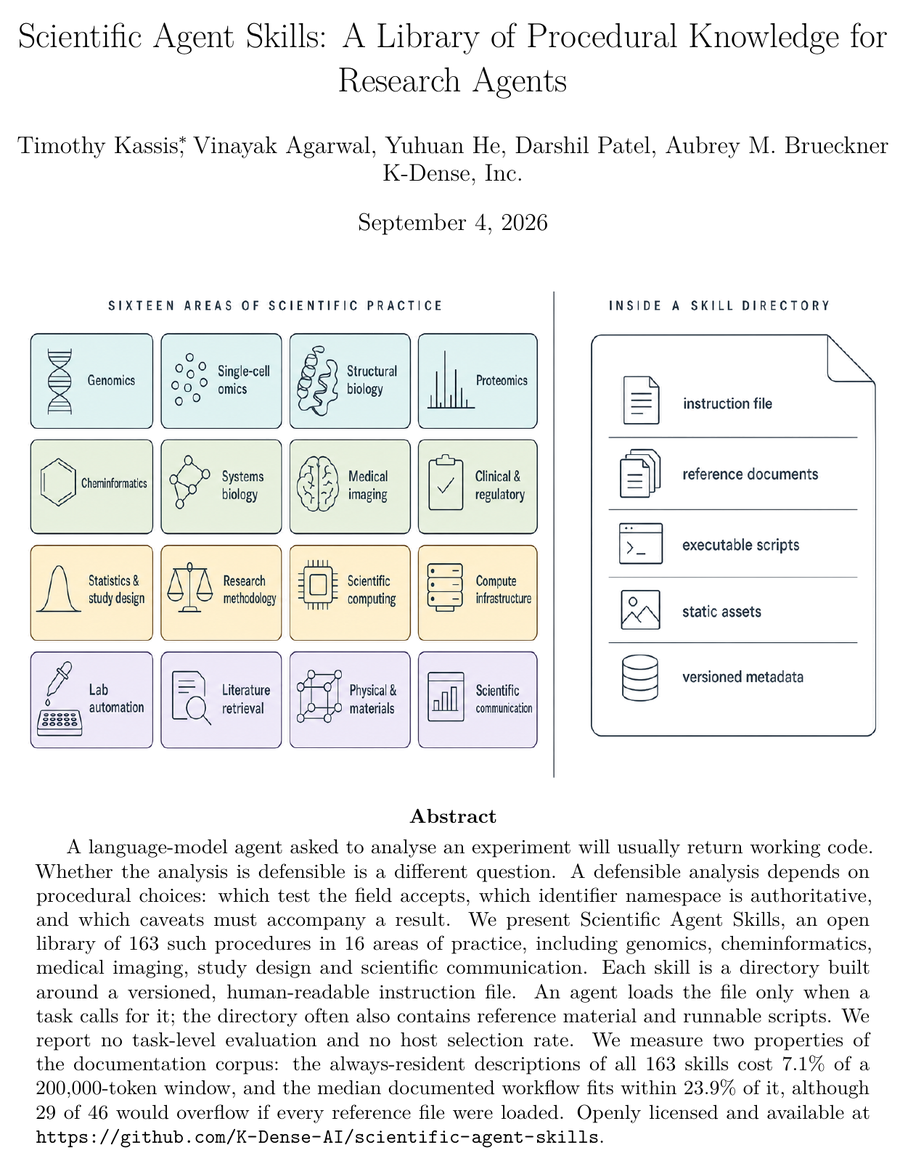
The second reason is rarer: the paper is candid about what it hasn’t shown. Its abstract says: “We report no task-level evaluation and no host selection rate.” Its limitations section is, in effect, a list of this chapter’s warnings, measured on a library of 163 skills (Table 4.2).
| The paper reports | This chapter’s point |
|---|---|
| No test of whether the skills improve an agent’s work: “Skills structure scientific judgment; they do not replace expert review” | A skill is a claim until you’ve tested it on a file where you know the answer |
| No measure of how often an agent picks the right skill. They could only compare descriptions’ wording; the closest pair is two chemistry toolkits | The description decides everything, and a skill that never loads fails silently |
| “A selected skill can still fail scientifically”: the agent may skip steps or load only part of it | Check the output, not just that the skill loaded |
| The descriptions of all 163 skills take up 7.1% of a 200,000-token context window before any of them is used. They recommend installing only what a project needs | Every installed skill costs context in every session |
| 32 of 163 skills don’t list the team as author, and community skills may get less review. Skills can run code | Read a SKILL.md before you install it |
A library can’t hold your lab’s knowledge. The pydeseq2 skill knows how to run DESeq2, carefully. It can’t know that the two Vahedi lab tables in the worked example below use opposite fold-change conventions, because that isn’t a fact about DESeq2; it’s a fact about these files. Use a library for the procedures a whole field shares, and write your own for what only your lab knows.
- The authors say they haven’t tested whether the skills help. Would you install one anyway? What would you want to see first, and could you run that test yourself, on one skill, in an afternoon?
- Would your agent get “3 mice with 100 cells each is n = 3” right without the skill? How would you find out? (The paper warns that if a strong model already gets a task right, a test can’t show a skill helping.)
- The repository describes itself as “used by 190,000+ scientists worldwide”. The paper says its installation estimate “counts clients that fetch the library, not scientists or sessions in which an agent used a skill”, and that “Reach is not use”. Which statement would you quote in a grant?
- How many skills would you install before the standing cost outweighed the benefit? Who in your lab would review a skill before everyone uses it?
- Which of your lab’s checks will never be in a public library?
4.4 Worked example: deseq2-triage
This workshop’s repository includes a skill, deseq2-triage, written for the two DESeq2 results tables in the Vahedi lab’s workshop repository (track-a/data/). DESeq2 (Love et al. 2014) results tables arrive without the facts you need to read them: the genome build, the coordinate convention, which group is the reference, and what was filtered before export. The numbers are fine. The context is missing.
The two tables make the point sharply. The data README says that in differential_genes.tsv a positive fold change means higher in wild type (lower in the knockout), while in differential_peaks.csv it means more H3K27ac in the knockout. The two files use opposite conventions, and neither says so.
4.4.1 Reading the skill, part by part
Open SKILL.md alongside this table. Each part is there for a reason.
| Part | What it says | Why it’s there |
|---|---|---|
name |
deseq2-triage |
Matches the folder name. Lowercase, hyphens. |
description |
What it checks, then “Use when the user asks to check, QC, sanity-check, triage, or look over a results table … or asks what is wrong with one or whether it can be trusted.” | This is what the agent matches your request against. It lists the words people actually use. |
| What this is for | The four missing facts. “Run these checks and report. Do not fix anything.” | Tells the agent the goal, so it can handle a table that doesn’t fit the steps exactly. |
| Step 2, direction | Work the direction out from the per-sample counts if they’re there. If not, report UNVERIFIABLE. “Do not infer it from column order, from group names … Do not guess.” |
The trap that matters most, and the one an agent is most tempted to paper over. Forbidding the specific guesses is what stops them. |
| Steps 3–6 | Missing padj, p-values of exactly 0, chromosome names, interval widths, duplicated IDs |
The lab’s known traps, each with the reason it matters (a naive filter drops rows; -log10(0) is infinity; chr1 never joins to 1). |
| Step 7, report | Three sections: Blocking, Worth knowing, Checked and fine, then the four facts to ask for | A fixed shape makes reports comparable from one file to the next, and puts what stops you first. |
| Constraints | Report only; don’t write a cleaned copy; don’t state a direction you haven’t shown from counts; stop | Agents are helpful. Without these, it may “fix” the table and carry on to a volcano plot. |
deseq2-triage/SKILL.md. The README beside it is for people: why the skill exists, and how to install it. The agent doesn’t need it.
Two lessons carry over to any skill you write. First, the “don’t” lines matter as much as the steps: each one closes off a helpful-looking move that would destroy the point of the check. Second, say why. “Count rows where padj is missing” gets you a number; adding “a naive padj < 0.05 filter silently discards those rows” gets you a warning a person will act on.
4.4.2 Running it
We ran it on 23 September 2026. We made an empty folder, copied the skill into .claude/skills/deseq2-triage/, downloaded the two tables, and asked Claude Code (Claude Opus 5.5) about each file in a fresh session. The prompt deliberately doesn’t name the skill:
I've been handed differential_peaks.csv by a collaborator. Can I trust it?
Sanity-check it before I use it.
Both times, the agent loaded deseq2-triage on its own: “sanity-check” and “can I trust it” are in the description. Here is the start of its report on the peaks file, unedited apart from shortening:
Blocking
- Fold-change direction: can’t be checked from this file. Without per-sample counts, nothing here shows which group a positive
log2FoldChangemeans. The reference level has to come from the analyst or their DESeq2 script […] If the direction is wrong, every “gained” peak is really a “lost” one.Worth knowing
- No missing
padjvalues, which suggests the table was filtered before export. […]- 4 rows have
pvalueandpadjexactly 0. That’s floating-point underflow, not certainty. On a volcano plot-log10(0)is infinity […]- Chromosome names use the Ensembl style (
1,2, …,X,Y), not UCSC (chr1). Joining against a UCSC-style file […] will match nothing, and it won’t raise an error.
On the genes file, it worked the direction out from the counts: “positive log2FoldChange means higher in WT than in CTCFBSKO”, consistent for all 60 significant genes, with Jun as the worked case. It flagged that 20,982 genes have no adjusted p-value, and explained that they are “not tested”, not “not significant”. That’s DESeq2’s independent filtering (Bourgon et al. 2010).
We didn’t take the report on trust. We recounted every number in it with a short script (rows, missing padj, zero p-values, the 60/60 direction check, the 16 duplicated gene symbols, the widths from 180 to 93,567 bp) and compared the findings with the quirks listed in the Vahedi lab’s data README. All matched.
4.4.3 The same question, without the skill
A skill is only worth having if it changes something. So we asked the same question, about the same files, in a folder with no skill (Table 4.4).
| Known problem (from the data README) | File | With the skill | Without it |
|---|---|---|---|
| Positive fold change means higher in WT | genes | Blocking; shown from counts, 60/60 | Found from counts; its first concern |
padj missing for 20,982 genes |
genes | Blocking; “not tested”, not “not significant” | Found; also “not tested” |
| 16 duplicated gene symbols | genes | Worth knowing: join on Gene_ID |
Mentioned as normal |
| Direction unstated, no counts to check it | peaks | Blocking: UNVERIFIABLE |
Half a sentence at the end of another point |
| 4 p-values of exactly 0 (underflow) | peaks | Worth knowing | Not mentioned |
No chr prefix |
peaks | Worth knowing: joins fail silently | Mentioned |
| Widths up to 93,567 bp | peaks | Worth knowing | “Minor” |
| Time taken | both | 48 s and 43 s | 91 s and 90 s |
The agent without the skill wasn’t careless. It did a lot: it reported recomputing the p-values and the Benjamini–Hochberg adjustment (we didn’t check that), and it noticed that three peaks on chromosome Y are strongly up. (We checked: they are.) But it chose its own checks, so it skipped one the lab knows matters (underflow). It buried the one that matters most for the peaks file (direction). And its explanation for the Y peaks, that “the two groups contain different numbers of males”, can’t be right as stated: the data README says these samples come from a cell line. The agent didn’t know that, because the file doesn’t say.
That’s the case for a skill in one table. Without it, you get a thoughtful answer that varies with the agent’s choices. With it, you get your lab’s checks, every time, in the same order, and it stops when it’s done.
4.5 Your turn: create your own
You’ll direct an agent to write a skill that checks a kind of file you handle often, then verify it. Budget 30–40 minutes. Figure 4.4 shows who does what.
flowchart TD
  accDescr: Flowchart - you describe the file and its traps, the agent interviews you
  A["<b>You</b>: the file, what good looks like,<br/>the traps you've seen"] --> B["<b>Agent</b>: interviews you,<br/>drafts SKILL.md"]
  B --> C["<b>You</b>: read the draft; test it on a good file,<br/>a file with planted problems,<br/>and the words that should load it"]
  C -- "something failed" --> D["<b>Agent</b>: revises,<br/>from what you found"]
  D --> C
  C -- "all passed" --> E["Keep it"]
4.5.1 1. Pick a file you check by hand
Your own material first. Good candidates are files that arrive from somewhere else and have burned you before (Table 4.5).
| File | The checks you might already do in your head |
|---|---|
| A sample sheet for the sequencing core | Duplicate IDs, inconsistent names, mixed date formats, missing conditions, characters the pipeline rejects |
| A qPCR export | No-template controls amplified, replicate Ct spread, missing wells, undetermined values |
| A peak file (BED, narrowPeak) | chr prefix, 0- or 1-based starts, zero-width peaks, genome build |
| A FastQC or MultiQC summary | Failed modules that matter for your assay versus ones that don’t |
| A flow cytometry or plate-reader export | Units, blank wells, saturated values, the plate layout |
No file of your own to hand? Use the Vahedi lab’s sample_sheet_messy.csv, a simulated RNA-seq submission sheet with known problems. (Their afternoon has an exercise that cleans this sheet. Here you’re writing a skill that checks sheets like it and fixes nothing.) Or extend deseq2-triage with a trap from your own lab’s pipeline.
To use the fallback, once you’ve made the skill folder and started a session on it (step 2), ask the agent to fetch the exact file rather than retype it:
Download this file into this folder, saving it byte for byte with a download
command, not your web-reading tool, and not by retyping it:
https://raw.githubusercontent.com/golnazvahedi/epigenetics-agentic-workshop/main/track-a/data/sample_sheet_messy.csv
Then tell me how many rows and columns it has.Anything the agent reads is sent to the model. Use a file you’d be allowed to email to a collaborator: no patient data, nothing identifiable, and nothing unpublished that your lab’s rules keep in-house. For a sensitive file type, describe it in words and make a small fake example.
4.5.2 2. Have the agent interview you
Make a folder called skill inside Documents/agents-workshop/, put a copy of your example file in it (or fetch the fallback, above), and start a new session on that folder, as in Setup. Then paste this, filling in the angle brackets:
I want you to write a skill (a SKILL.md in the Agent Skills format) that checks
<a kind of file, e.g. "the sample sheets we send to our sequencing core"> before
anyone uses it. There's an example in this folder: <file name>.

Don't write anything yet. First interview me, one question at a time, about:
- where these files come from, and what a good one looks like;
- the problems I've actually seen in them, and which would lead to a wrong result;
- anything that can't be checked from the file alone and must be asked of a person;
- what the skill must never do (for example, change the file);
- the words I'd use when asking for this check.

Then show me a draft. The skill must report problems, not fix them, and must say
plainly when something can't be checked from the file. Save it to
.claude/skills/<short-name>/SKILL.md in this folder only when I say it's right.
Answer from experience. The most useful answers are specific: not “check the dates” but “we’ve had three date formats in one sheet, and 3/2/26 means 3 February to our UK collaborators”.
4.5.3 3. Read the draft before you accept it
It’s short; read all of it. Check that:
- the description says what it does, then when to use it, in your words;
- every trap you mentioned is there, with the reason it matters;
- there’s a “do not” for each helpful-looking move you don’t want (fixing the file, filling in missing values, carrying on to an analysis);
- the report has a fixed shape, with what stops you first;
- it doesn’t claim to check something it can’t. Ask the agent: “Which of these checks could give a wrong answer, and how would I know?”
Ask for changes in plain language. Then let it save the file.
4.5.4 4. Test it on a file where you know the answer
Testing is your job, not the agent’s. It needs two files.
- A good file. A real one you’ve already checked by hand. The skill should report little or nothing, and nothing false.
- A bad file. Copy the good one and break it yourself: add a duplicate row, delete a value, change one date format, misspell a sample name. Write down what you broke before you run the check. Then you know exactly what it should find.
Run each in a new session, so the agent that wrote the skill can’t answer from memory, with a prompt that doesn’t name the skill:
I've just been sent <file name>. Is it OK to use?Compare what it reports with your list. Anything missed means the instructions need work. Anything it invented is worse: tell the agent exactly what it claimed, and ask it to change the skill so that can’t happen again.
4.5.5 5. Test the description
Now test the part that decides whether the skill ever runs. Write three requests that should load it and three neighbouring ones that shouldn’t. Use how you’d really ask, not how you’d describe the skill.
| Should load it | Should not load it |
|---|---|
| “Can you look over this sample sheet?” | “Make me a blank sample sheet template” |
| “Is this ready to send to the core?” | “What does the core charge per lane?” |
| “Anything wrong with tconv_batch2.csv?” | “Plot the harvest dates in this sheet” |
Try each in a new session. If you can’t tell from the transcript whether the skill was used, ask “Did you use a skill for that?”. When a phrasing you’d genuinely use doesn’t load it, tell the agent the phrase and ask it to revise the description, then test again. The usual failure is a skill that loads too rarely, not too often, so lean towards a description with more of your everyday words in it.
Ask “What skills are available?”. If yours isn’t listed, the folder is in the wrong place, or the header between the --- lines is malformed. Ask the agent to check both. You can always run a skill directly by typing / and its name.
4.6 What to notice
- You wrote almost none of it, and it still encodes exactly what you know. The value was in your answers and your tests, not the typing.
- The “do not” lines did real work. Without them, a checking skill drifts into a fixing skill, and a fixed file hides the problem you most needed to see.
- The agent can’t verify its own skill. It can check that the file is well formed. Only a file where you know the answer tells you whether the checks are right.
- The description is an interface. It failed silently or it worked; there was no error message either way.
4.7 Check yourself
4.8 Going further
- Real examples. Anthropic’s life-sciences repository publishes skills for scientific work. Read
single-cell-rna-qc: aSKILL.mdthat runs Python scripts fromscripts/and reads scverse QC guidance fromreferences/only when needed. It’s the same format you just used, grown larger. - Try a library skill, one at a time. To try one skill from Scientific Agent Skills
- in a project, read its
SKILL.mdon GitHub first, then ask:
The repository’s README describes installers for the whole collection. Its own security advice is not to install everything at once.Download only the pydeseq2 skill from https://github.com/K-Dense-AI/scientific-agent-skills (the folder skills/pydeseq2, with everything in it) into .claude/skills/pydeseq2 in this folder. Don't install anything else, and don't run any of its scripts. If git isn't available, download the files one by one. Then list the files you saved and show me the header of its SKILL.md. - in a project, read its
- A skill for writing, not science. humanizer (MIT licence) edits a draft to remove the habits that make text read as machine-written: stock phrases, em dashes, lists of three, praise nobody asked for. Its checklist comes from Wikipedia’s “Signs of AI writing” guide. It’s a good skill to read before you install, because the skill itself is one
SKILL.mdin plain English. It’s also a good one to test: give it a paragraph you wrote yourself, and see what it wants to change. The speaker notes for this workshop’s talk were edited with it. - Share it with your lab. A skill in a project’s
.claude/skills/travels with the project. Put it in a shared lab folder or repository (Chapter 7), and every trainee who starts there gets your checks without having to know they exist. - Measure it. The
skill-creatorplugin for Claude Code runs a skill against test prompts with and without it, and suggests description changes. See “Evaluate and iterate on a skill” in the skills documentation (“Extend Claude with Skills,” n.d.). - Connect it to data. Skills tell an agent how; MCP servers (Chapter 5) give it access to databases it can’t otherwise reach. The two combine.