6 Build an app
In Chapter 1 you asked for a web page and got one. That page said things. An app does things: it reads your file, works something out, and shows you an answer. That is where agents are at their most impressive, and where they fail most quietly. Ask for “a page that looks up my genes in a DESeq2 table” and within a few minutes you’ll have one that loads, looks tidy and gives answers. Whether those answers are right is a separate question, and the page won’t tell you. A fold change read the wrong way round, an NA treated as “not significant”, chr10 sorted before chr2: each one produces a page that works perfectly and is wrong.
This morning’s talk put the reason plainly. A one-line request leaves dozens of decisions unmade, and the agent quietly guesses every one. Most guesses are reasonable. All of them being right is the unlikely part. The fix is not a cleverer model or a longer prompt. It’s a specification: a short document that says what the app does, what it doesn’t, what goes in, and how you’ll know it’s right. It records the decisions, so nobody has to guess them.
You won’t write that spec yourself, and you won’t write any code. The agent will interview you, one question at a time, and write the spec from your answers. Then it builds the app from the spec. Your job is the part only you can do: knowing what would actually help in your work, and knowing the right answers for a small test case. This chapter gives you a starter prompt that runs the whole conversation, from “what do you work on?” to a working app in a folder on your laptop.
6.1 What you’ll learn
- What goes in a small, useful spec, and what goes wrong when each part is missing.
- Why a test case with answers worked out by hand is the most important part of it.
- How to let an agent interview you into a spec, rather than writing one.
- How to pick a way of building that needs nothing new on your computer, on Windows or macOS.
- How to read an agent’s “what I checked” report, and what to do with “what I couldn’t”.
6.2 What a spec is
A spec for a small app fits on two pages. It has seven parts (Table 6.1), and each one exists because of a particular way things go wrong.
| Part | What it says | Without it |
|---|---|---|
| Purpose | Who it’s for, and the one question it answers | The app grows features nobody asked for |
| What it does | A numbered list of behaviours | The agent decides, and each build decides differently |
| What it doesn’t | Non-goals, said out loud | Plots, databases and logins arrive uninvited |
| Inputs | Formats, with a real example of each | It works on the agent’s invented example, not your file |
| Tiny test case | An input small enough to check by eye, and its answers, worked out by hand | “It works” means “it runs” |
| Open decisions | Each choice, with a suggested default | Silent guesses, discovered months later |
| Done when | A checklist you can tick yourself | Nobody knows when to stop |
The test case deserves a word of its own. An agent that writes the code and works out the expected answers by running that code has only shown that the code agrees with itself. The answers have to come from somewhere else: from rules written down before any code existed, checked by a person. That’s you. The rule that goes with it is simple: never change the answers to make a test pass. If the code disagrees with an answer you checked, the code is wrong.
Fixture is the programmer’s word for a small test file with known answers. PeakPeek’s is 17 lines long, and every line is there to catch one particular mistake.
The order matters as much as the parts. The conversation goes from your work to your computer to the spec, and only then to code, with you approving the spec before anything is built (Figure 6.1).
flowchart TD
  accDescr: A flowchart in two boxes. The first, Conversation - no code yet, runs 1 the idea, 2 your computer, 3 the spec, then a decision - you approve? Not yet loops back to the spec. Approved leads to the second box, Build and check - 4 build, then check against the hand-worked answers, with fails looping back to build.
  subgraph talk ["Conversation: no code yet"]
    direction LR
    A["1. The idea<br/>what do you work on?"] --> B["2. Your computer<br/>what's installed?"]
    B --> C["3. The spec<br/>SPEC.md + test case"]
    C --> D{"You<br/>approve?"}
    D -- "not yet" --> C
  end
  subgraph build ["Build and check"]
    direction LR
    E["4. Build"] --> F["Check against the<br/>hand-worked answers"]
    F -- "fails" --> E
  end
  talk -- "approved" --> build
6.3 Worked example: PeakPeek
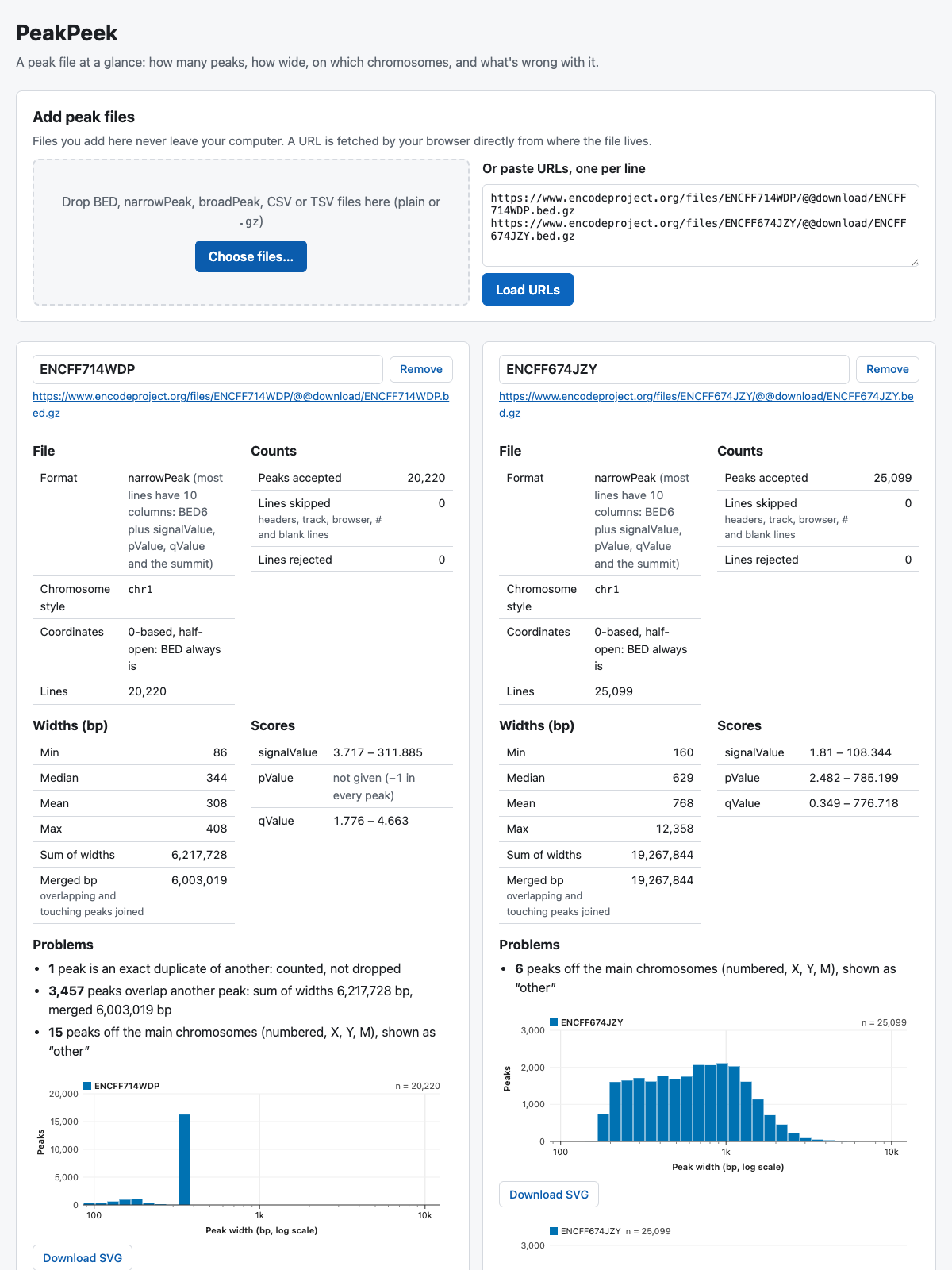
PeakPeek is a page that tells you what’s in a peak file: how many peaks, how wide, on which chromosomes, and what’s wrong with the file. Its spec is much longer than the one you’ll write, about 440 lines, because it was written to be built by a roomful of people without anyone to ask. But it has the same seven parts. Its reference data are five public ENCODE peak files from mouse thymus (Abascal et al. 2020), with the right answers for each worked out with awk, Python and bedtools, independently of any app. Its fixture is a 17-line BED file with a blank line, a zero-width peak, a start that isn’t a number, and a chr10 placed to catch anyone who sorts chromosome names as text.
With a spec that complete, the building was not the slow part. We gave a fresh agent (Claude Opus 5.5) an empty folder, the spec and a single prompt, twice. It built the whole page in 15 minutes the first time and 13 the second, and both pages worked first time, with every test passing (Figure 6.2 shows the finished version).
bedtools.
What the builds got wrong is more instructive than what they got right. Almost every problem traced back to the spec, not the code:
- An undefined word. The spec asked for a count of “overlapping peaks” but never said what counted as overlapping. Two builds chose differently and reported 1,763 and 3,457 for the same CTCF file. Both were reasonable; they couldn’t both be the answer.
- A wrong definition, with the right answer. The spec said the CTCF file had one “exact duplicate” line. It has two lines with the same position and different scores. The count of 1 was right; the description was wrong. A build found it.
- A rule that contradicted itself. “Accept
1e+03, reject1.5e2” looks tidy until you notice that 1.5e2 is 150, a perfectly good whole number, and that R writes large numbers exactly this way. - Something that could never work. The first draft had the test page read its answers from a separate file. A page opened by double-clicking isn’t allowed to read other files, so that test could never have passed. The answers moved into a script.
Every fresh build found something. That’s the case for running the check, and for having a spec to fix: the correction goes into one place, and the next build gets it. The finished PeakPeek is public at https://github.com/seandavi/peakpeek, and you can use it at https://seandavi.github.io/peakpeek/.
6.4 Worked example: the starter prompt, tested
The prompt you’ll use in a moment was tested before it reached you. We played the part of an attendee: a postdoc studying gene regulation in B cells, with a DESeq2 (Love et al. 2014) results table from the Vahedi lab’s workshop data and a project folder with the kind of AGENTS.md you wrote in Chapter 3. The agent was Claude Code on a Mac. The answers were ours, typed from a script, so your conversation will go differently; that’s the point of it.
Here is what happened, stage by stage.
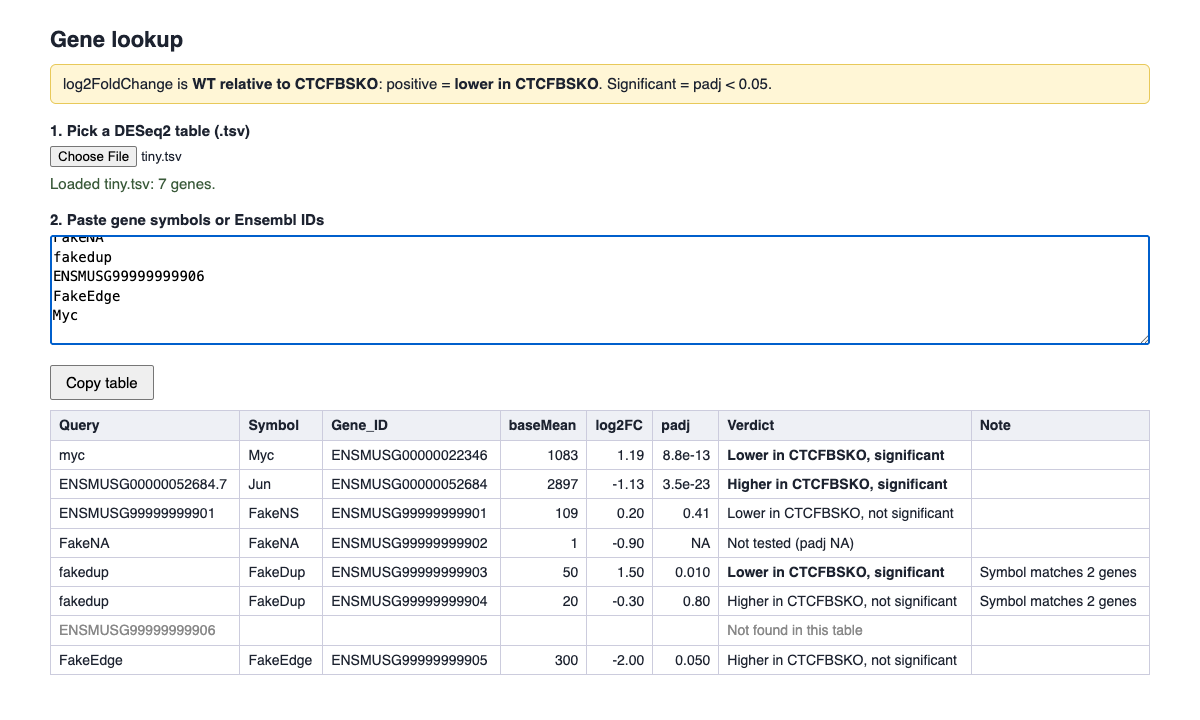
The idea. The agent read the project’s README and AGENTS.md, then asked before opening the data. Allowed to look at the first few lines, it checked the fold-change direction against the raw counts itself (Myc: about 600 reads in the knockout, 1,600 in wild type, log2 fold change +1.19, so positive means lower in the knockout, as AGENTS.md said). It then offered three ideas, each built around a mistake the table invites: a gene lookup that states the direction in words, a sanity report for any new table from the core, and an exporter for significant-gene lists. We picked the lookup.
Your computer. Without installing anything, it reported the operating system and versions of R, RStudio, Python, Node and git, then recommended a single web page, on the grounds that it needs nothing new, works on Windows, and keeps the data on the laptop.
The spec. 130 lines, all seven parts. The test case was a seven-gene table: two real genes copied from the file and five made-up ones, each built to test one trap: a padj of NA, a symbol shared by two genes, a padj of exactly 0.05, an Ensembl ID with a version suffix, and an ID that isn’t in the table. It showed its working for each answer and asked us to confirm them. It raised five open decisions, and flagged the one that mattered most: keep the fold change as written in the file, and let the words carry the direction.
The build. Two minutes. Its own test compared the page’s output with our eight approved rows and matched every one. It reported what it had checked, and what it hadn’t: it had not clicked through the page itself, nor tried pasting into slides. So we did: the page, opened in Chrome and given the test file, produced exactly the eight rows (Figure 6.3).
padj, a shared symbol, a padj of exactly 0.05, an ID that isn’t there. The yellow line states the direction of the fold change at all times.
Three things went less well, and the prompt below was changed because of them:
- Its test needed Node, a programming tool many attendees won’t have, especially on Windows. The prompt now asks for a test you can run with only what’s on your computer: for a web page, a
test.htmlyou double-click. A second run of the revised prompt did exactly that, and itstest.htmlshowed 17 of 17 checks passing when we opened it. - It went beyond the spec without asking. It added a second clipboard format so tables paste properly into slides. That was sensible, and it told us, but the prompt had said to ask first. The second run did the same with three small choices, listed them, and asked afterwards. Watch for this: an agent’s idea of “obviously helpful” is still a decision, and decisions belong in the spec.
- We rubber-stamped the answers. Our script said “all correct” without checking. We checked afterwards, and they were, but that’s luck, not a method. The second run’s spec had eleven answers, including fold changes like 20.3 = 1.23: easy to check with a calculator, and easy to skip.
In the second run, with the same scripted answers, the agent made a different and arguably better choice: the app refuses to show results until you say which group a positive fold change favours, because getting that backwards is the most likely mistake. It asked before reading more than the first few lines of the real file, and the whole conversation took under seven minutes of the agent’s time, four of them building. Same prompt, same person, different app. Neither is wrong. That’s why the spec exists: it’s where you see the choice and make it yours.
6.5 Your turn
You’ll need about 30–45 minutes, most of it conversation. The build itself is usually the short part.
6.5.1 1. Make a folder, start a new session
Make a new folder called my-app inside Documents/agents-workshop, next to the folders from earlier chapters. Not inside your project from Chapter 3: the app is a new thing, and it gets its own folder. Start a new session on it, as in Setup (in the Claude desktop app, choose the folder as the session’s project folder), and check with “what folder are you in?”
If you did Chapter 3, have the path to that project folder to hand. The agent will ask.
If you did the readiness check in Setup, the answer to Stage 2 is already written down, in agents-workshop/readiness.md. When the agent gets to Stage 2, tell it: “Read ../readiness.md first, and only check what it doesn’t cover.” It will ask permission to read outside my-app. That’s fine: it’s one file, one folder up.
The app itself can keep your data on your laptop: a page opened by double-clicking reads files without sending them anywhere. The conversation doesn’t. Anything the agent reads, including “the first few lines of the data file”, is sent to the model. The morning’s rule applies: nothing identifiable, no patient data, nothing unpublished you aren’t allowed to share. If in doubt, ask the agent to invent a small example in the same format, and try your real file only in the finished app.
6.5.2 2. Paste the starter prompt
I'd like to build a small app with you: one I'd actually use in my work. I don't write
code, and I don't want to start now. Lead me through it in four stages, and don't start
the next stage until I say so. Ask me one question at a time. Look around before you ask
anything you could find out yourself.

Stage 1, the idea. Ask what I work on. If I point you to a project folder, read its
README and AGENTS.md (or CLAUDE.md) first, and ask before opening anything else there.
Then suggest three small app ideas that would save me time or catch mistakes in my
work. Each should be something I could describe in two sentences and try on one file.
Help me pick one and cut it down to the smallest useful version.

Stage 2, my computer. Without installing anything, find out which operating system I'm
on and whether R, RStudio, Python, Node and git are installed. Tell me what you found.
Then pick the simplest way to build the app that needs nothing new. If in doubt, make
it a web page: one folder, opened by double-clicking index.html, with no server, no
packages and no internet needed to run it. It must work on Windows as well as macOS.

Stage 3, the spec. Write a short SPEC.md in this folder, two pages at most:
- Purpose: who it's for, and the question it answers.
- What it does, as a numbered list.
- What it doesn't do.
- Inputs: formats, with a real example of each.
- A tiny test case: an input small enough to check by eye, and its right answers,
  worked out by hand. Show me the working, and ask me to confirm each answer.
- Open decisions, each with a suggested default.
- Done when: a short checklist I can tick myself.
Then ask me to read it. Write no code until I say "approved".

Stage 4, the build. Build exactly what SPEC.md describes. Save the test case and its
answers as files, with a test I can run myself using only what's on my computer (for a
web page, a test.html I double-click). Never change the answers to make a test pass: if
the code disagrees, fix the code, or stop and tell me. If something needs more than the
spec says, ask me first. Then add an entry to LEDGER.md (start one if there isn't one),
with the headings Asked / Agent did / Checked how / Confidently wrong / Keep, and tell
me how to open the app, what you checked and how, and what you couldn't check.
6.5.3 3. Have the conversation
A few things make it go well.
- Answer in your own words. “I get DESeq2 tables from the core and I always forget which way the fold change goes” is a perfect answer. So is “I don’t know, what would you suggest?”
- Say “smaller”. The first idea is almost always too big. The smallest useful version is something you could try on one file this afternoon.
- Take the suggested defaults for the open decisions the first time through, unless one is plainly wrong for your work. You can change them later; that’s what the spec is for.
- Check the test answers yourself. This is the one step you can’t hand over. Work each one out from the rules in the spec, with a calculator if you need one. If you can’t tell whether an answer is right, the rule is unclear: ask for it to be rewritten.
- Read the spec before you say “approved”. Two pages. Anything you don’t understand is a question worth asking now.
- The agent wants to install something. Say no, and ask for a way that needs nothing new. A web page almost always works.
- The spec is long. “Cut it to two pages; move anything optional to ‘What it doesn’t do’.”
- It stopped halfway through the build. Say “continue”.
- A blank page. Open the browser’s console (⌥⌘J on a Mac, Ctrl+Shift+J on Windows, in Chrome or Edge) and paste the red text to the agent.
- A test fails. Ask “is the code wrong, or the expected answer?” You checked the answers, so it’s the code, unless you find you made a mistake. If you did, fix the answer in the spec first, deliberately, and say why in the ledger.
- Double-clicking
index.htmlopens it in your default browser, usually Edge. That’s fine: Edge and Chrome behave the same here. - File extensions are hidden by default, so
index.htmlmay show asindex; see - Checking what’s installed: the agent may run commands in PowerShell rather than a Unix shell, and ask permission for each. They only read version numbers; allowing them is safe.
- R and RStudio are often installed without being on the command line’s path, so the agent may not find them at first. If you know they’re there, tell it.
6.5.4 4. Try it, then save it
Open the app and run its test first: every answer should match the ones you checked. Then try it on a real file, and on something it should reject. Ask the agent about anything that surprises you.
Chapter 7 carries on with this app, so keep the folder. When you’re happy with it, ask:
Copy everything in this folder except snapshots/ into snapshots/first-build/.Build PeakPeek instead. The spec is finished, and one prompt builds it: PeakPeek: a page built in one prompt. Then come back and use the starter prompt on an idea of your own when one arrives.
6.6 What to notice
- The questions found decisions you didn’t know you were making. Which way does the fold change go? Is exactly 0.05 significant? What happens to a gene that isn’t there? Each one would have been a silent guess.
- The build was fast; the checking was yours. A few minutes of building sat behind a conversation several times as long. That’s the right proportion.
- “What I couldn’t check” is the most useful part of the report. In our test, the agent couldn’t click through its own page. It said so. The page was right, but only because we went and looked.
- Did it go beyond the spec? Anything it added unasked is a decision somebody made without you. Put it in the spec, or take it out.
6.7 Check yourself
6.8 Going further
- A new session for the build. For anything bigger than this, the Claude Code documentation recommends writing the spec in one session and building from it in a fresh one, which has nothing in its context but the spec (“Best Practices for Claude Code,” n.d.). The spec is the distillate; hand over the distillate, not the conversation.
- Build it twice. Give the same spec to two fresh sessions and compare the apps. Wherever they differ, the spec left something open.
- A bigger spec. Spec first, then build: peak overlap is a spec at the scale of a real project, and peakwhere is that spec built by agents, with every decision and review on the record.
- Keep going with your app. Chapter 7 turns it into a project: a ledger entry for every change, a record of each decision, and a way back when a change goes wrong.